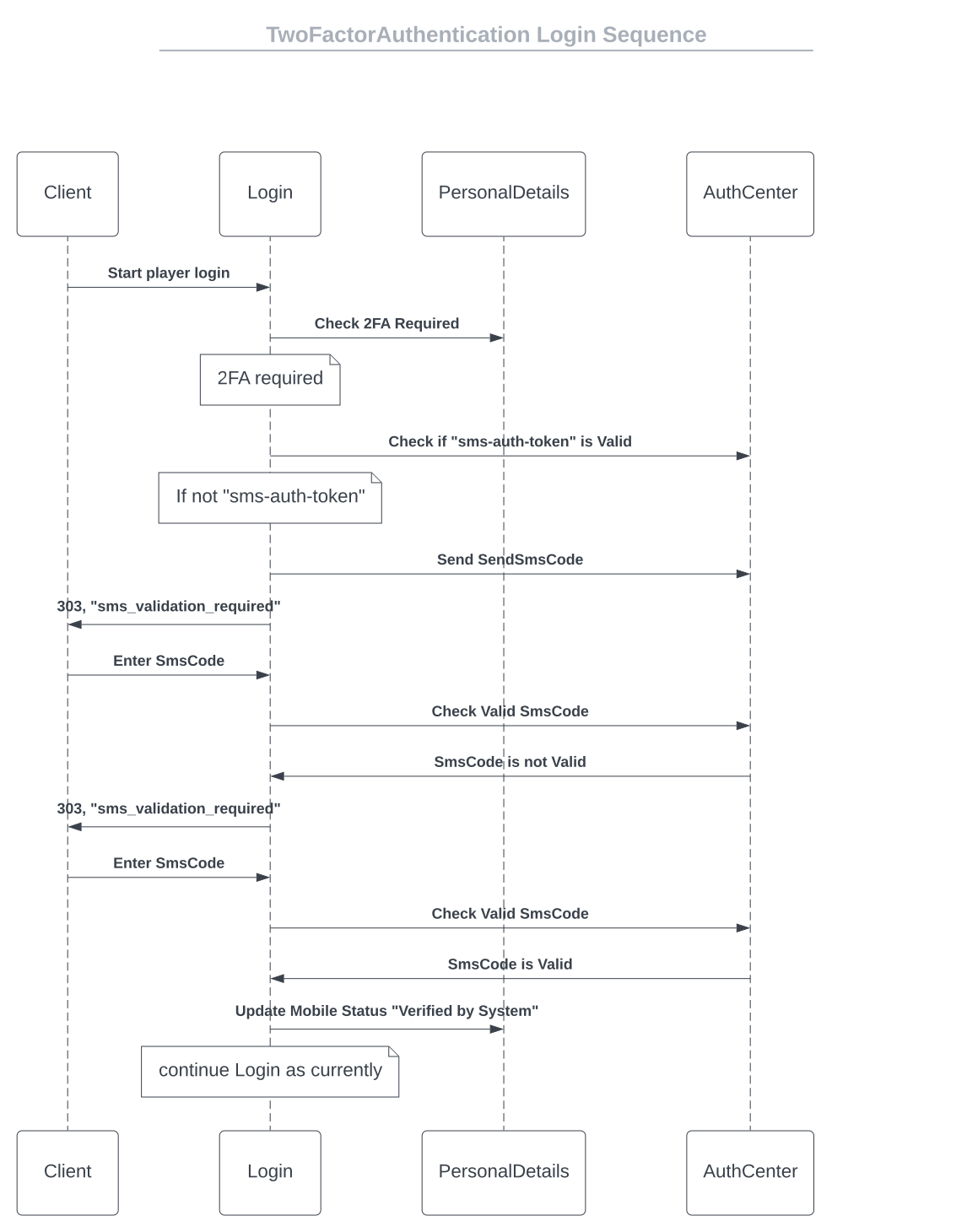
Send Code
Endpoint that is used to send code to player, part of the verification of the player.
Request (POST)
/gateway/player-data/{version}/send/code/{brand_id}
Parameters:
{
  "mobile_number": "44-123456789"
}
| Name |
In |
Type |
Required |
Description |
| version |
path |
string |
true |
The API version to use. |
| brand_id |
path |
int |
true |
The ID of the casino. If a brand_id is not provided, all message formats will be fetched from default storage. |
| x-auth-token |
header |
string |
true |
Player login session. |
| 2fa-auth-token |
header |
string |
true |
2fa auth token, which will be saved in browser. |
| mobile_number |
body |
string |
true |
Player request phone number. |
Response
Status 200
200 Response
{
  "status": "Success",
  "data": {
    "description": "Success",
    "2fa_auth_token": "c8bfd06c-f934-4cb9-a554-694825b89328"
  }
}
Status 400
{
  "errMsg": "invalid input - invalid brand id"
}
Status 401
{
  "errMsg": "invalid input - invalid token"
}
If you receive a 422 error code for an Unprocessable Entity error, the client should not use the Message Format method
to send a request to the server, but use its internal logic to present the message for one or more fields that didn’t
pass the validation.
When a 422 validation error occurs, the response returns an array of one or more error codes detailing the fields that
have validation errors. Multiple error messages are issued in the same validation form. The site should handle these
validation errors and present a validation message to the player.
This will not call the message format.
The following table explains validation code behavior:
| Field |
Description |
| 2fa-auth-token |
Auth Token is already verified |
| description |
Please wait before sending again |
| description |
Please wait before sending again in %d seconds |
| description |
Authentication attempts limit exceeded |
| description |
Auth token does not exist |
| remaining_time* |
Seconds left before additional call will be allowed (Optional) |
{
  "status": "Failed",
  "data": {
    "description": "Please wait before sending again in 50 seconds",
    "2fa_auth_token": "c8bfd06c-f934-4cb9-a554-694825b89328",
    "remaining_time": 50
  }
}
Status 500
{
  "result": "internal server error"
}
Validate Code
Endpoint that is used to validate code from player, part of the verification of the player. Please not, we are executing
login if 2fa was successfully validated, response within the ‘data’ section will contain same response as we currently
have in login method (on success with additional fields), all additional validations that needs to be done (i.e
TNC_REQUIRED) will be returned in the 422 error code under data section, with player token as well, can be used
Request (PUT)
/gateway/player-data/{version}/validate/code/{brand_id}
Parameters:
| Name |
In |
Type |
Required |
Description |
| version |
path |
string |
true |
The API version to use. |
| brand_id |
path |
int |
true |
The ID of the casino. If a brand_id is not provided, all message formats will be fetched from default storage. |
| x-auth-token |
header |
string |
true |
Player login session. |
| 2fa-auth-token |
header |
string |
true |
2fa auth token, which will be saved in browser. |
| sms_code |
body |
string |
true |
received code from player. |
Response
Status 200
200 Response
{
  "status": "Success",
  "data": {
    "description": "Valid",
    "2fa_auth_token": "c8bfd06c-f934-4cb9-a554-694825b89328",
    "updated_fields": {
      "mobile_number": "44-12456789",
      "verification_status": "1"
    },
    "result": "OK",
    "token": "8e62cc96-a21f-11ed-be7e-b289e620c23d",
    "auth_token": "8e62cc96-a21f-11ed-be7e-b289e620c23d",
    "status": 200
  }
}
Status 400
{
  "errMsg": "invalid input - invalid brand id"
}
Status 401
{
  "errMsg": "invalid input - invalid token"
}
If you receive a 422 error code for an Unprocessable Entity error, the client should not use the Message Format method
to send a request to the server, but use its internal logic to present the message for one or more fields that didn’t
pass the validation.
When a 422 validation error occurs, the response returns an array of one or more error codes detailing the fields that
have validation errors. Multiple error messages are issued in the same validation form. The site should handle these
validation errors and present a validation message to the player.
This will not call the message format.
The following table explains validation code behavior:
| Field |
Description |
| 2fa-auth-token |
Auth Token is already verified |
| 2fa-auth-token |
Auth token does not exist |
{
  "status": "Error",
  "data": {
    "description": "Please wait before sending again in 50 seconds",
    "2fa_auth_token": "c8bfd06c-f934-4cb9-a554-694825b89328"
  }
}
Status 500
{
  "result": "internal server error"
}
Get Player Mobile Data
Endpoint that is used to get player mobile data.
Request (GET)
/gateway/player-data/{version}/{brand_id}
Parameters:
| Name |
In |
Type |
Required |
Description |
| version |
path |
string |
true |
The API version to use. |
| brand_id |
path |
int |
true |
The ID of the casino. If a brand_id is not provided, all message formats will be fetched from default storage. |
| x-auth-token |
path |
string |
true |
Player login session. |
Response
200 Response
{
  "status": "Success",
  "data": {
    "brand_id": 1009,
    "player_id": 32574,
    "is_2fa_required": true,
    "mobile": {
      "number": "44-123456789",
      "verification_status": 1,
      "status": "Active",
      "status_comment": "Comment"
    }
  }
}
Status 400
{
  "errMsg": "invalid input - invalid brand id"
}
Status 401
{
  "errMsg": "invalid input - invalid token"
}
Status 500
{
  "result": "internal server error"
}
Update Player Mobile Data
Endpoint that is used to update player mobile data.
Request (PUT)
/gateway/player-data/{version}/send/code/{brand_id}
Parameters:
{
  "brand_id": 1009,
  "player_id": 32574,
  "is_2fa_required": true,
  "mobile": {
    "number": "44-123456789",
    "status_comment": "Comment"
  }
}
| Name |
In |
Type |
Required |
Description |
| version |
path |
string |
true |
The API version to use. |
| brand_id |
path |
int |
true |
The ID of the casino. If a brand_id is not provided, all message formats will be fetched from default storage. |
| x-auth-token |
path |
string |
true |
Player login session. |
Response
200 Response
{
  "status": "Success",
  "data": null
}
Status 400
{
  "errMsg": "invalid input - invalid brand id"
}
Status 401
{
  "errMsg": "invalid input - invalid token"
}
Status 403
{
  "status": "Error",
  "data": {
    "data": "194eba0c-a6f0-11ed-aca7-caa409abce86"
  },
  "message": "Mobile verification required",
  "userFriendlyMessage": "Mobile verification required"
}
Status 500
{
  "result": "internal server error"
}