Player Management
Player Management Endpoints
This section will display all player endpoints.
This section will display all player endpoints.
This section will display all available endpoints to get admission data (Registration / Login).
This method creates an account for a player. The account is temporary and incomplete. If the player logs in to an incomplete account, they are automatically redirected to Registration Step two to complete their registration. use gateway.[msdomain] Parameter signOptOut required only for Malta or UK regulated brands
/gateway/reg-step-one/{version}/{brand_id}{
"loginName": "string",
"email": "string",
"password": "stringst",
"over18": true,
"signTNC": true,
"signOptOut": true,
"language": "en",
"btag": "string",
"bonusCode": "string",
"currency": "EUR",
"aff_extra_param": "string"
}| Name | In | Type | Required | Description |
|---|---|---|---|---|
| version | path | string | true | The API version to use. |
| brand_id | path | int | true | The ID of the casino. If a brand_id is not provided, all message formats will be fetched from default storage. |
| loginName | body | string | true | Player user name to login with, user will be considered as test account if it has ‘qqtst_’ prefix. |
| body | string | true | Player personal email. | |
| password | body | string | true | Player password to login with. |
| over18 | body | boolean | true | Player confirmation he is over 18. |
| signTNC | body | boolean | true | Player confirmation he has read and accept TnC and Privacy policy. |
| signOptOut | body | boolean | false | Player notification if he does not want any notification via: chat/sms/chat. |
| language | body | string | true | Player chosen language, this will be the language player receives mails in. |
| btag | body | string | true | Affiliation system reference. |
| bonusCode | body | string | false | Promotion code which will determine bonuses to give. |
| currency | body | string | true | Player currency to use in site. |
Status 200 The response to a successful result contains an
OKstring with theauth_tokenthat you need to use in the * Register Player - Step 2* call.
{
  "auth_token": "32fc6f4e-6a54-4807-8988-9911cb2aff92",
  "result": "OK",
  "player_id": 123
}
Status 400
{
  "errMsg": "invalid input - invalid brand id"
}
Status 401
{
  "authToken": "null",
  "result": [
    {
      "field": "null",
      "errorCode": "Internal_server_error"
    }
  ]
}
The bonus code provided doesn’t exist in the system.
{
  "field": "bonusCode",
  "errorCode": "invalid_bonus_code"
}
If you receive a 422 error code for an Unprocessable Entity error, the client should not use the Message Format method to send a request to the server, but use its internal logic to present the message for one or more fields that didn’t pass the validation.
When a 422 validation error occurs, the response returns an array of one or more error codes detailing the fields that have validation errors. Multiple error messages are issued in the same validation form. The site should handle these validation errors and present a validation message to the player.
This will not call the message format.
The following table explains validation code behavior:
| Field | Error Code | Description |
|---|---|---|
| loginName | login_required | A login name is required. |
| loginName | login_already_exists | A user with this name already exists. |
| loginName | login_not_enough_char | The user name must contain at least 6 characters. |
| loginName | login_long | the login name must not exceed 15 characters. |
| loginName | login_invalid_char | |
| email_required | An email address is required. | |
| email_syntax_error | The email syntax is wrong. Format is aaa@bbb.ccc. | |
| email_fraud | The mail domain will be checked against a fraud list (test players qqtst_ will not be checked). | |
| email_already_exists | Email already exists. | |
| password | password_short | The password is too short. It must have at least 8 characters, including a combination of digits and letters. It should also contain at least 4 different characters. |
| password | password_long | Password cannot exceed 15 characters. |
| password | password_match_user_name | Password must be different from the email and username. |
| password | password_same_letters | Password has too many repeating characters. It must have at least 8 characters, including a combination of digits and letters. It should also contain at least 4 different characters. |
| password | password_mix_characters | The password must have a combination of letters and digits. |
| bonusCode | invalid_bonus_code | The bonus code doesn’t exist in the system. |
| over18 | over_18 | The user didn’t mark the “over 18” field and/or sign the T&C. |
| currency | currency_unknown | The currency provided is unknown. |
| genericError | generic_error | The language provided is invalid. |
{
  "auth_token": null,
  "result": [
    {
      "field": "loginName",
      "errorCode": "login_already_exists"
    },
    {
      "field": "email",
      "errorCode": "email_already_exists"
    },
    {
      "field": "currency",
      "errorCode": "currency_unknown"
    }
  ]
}
Status 500
{
  "result": "internal server error"
}| Name | Description |
|---|---|
| auth_token | UUID to be used when sending registration step two request. |
| player_id | unique id for the generated player. |
This method completes the user registration process and makes the player’s account permanent.use gateway.[msdomain]
/gateway/reg-step-two/{version}/{brand_id}{
"auth_token": "9deda661-7e8d",
"firstName": "Firstname",
"lastName": "Lastname",
"birthDate": "01/01/1990",
"gender": "M",
"language": "en",
"country": "HU",
"city": "City",
"address": "st. Somestreet, 10",
"zipCode": "12345",
"mobileNumber": "39-34535345",
"uuid": "102d7d3834f4694ef00662"
}| Name | In | Type | Required | Description |
|---|---|---|---|---|
| version | path | string | true | The API version to use. |
| brand_id | path | int | true | The ID of the casino. If a brand_id is not provided, all message formats will be fetched from default storage. |
| auth_token | body | string | true | Token received from step one result OR token received during login with incomplete registration status. |
| firstName | body | string | true | Player first name. |
| lastName | body | string | true | Player last name. |
| birthdate | body | boolean | true | Player date of birth, should be in format of: DD/MM/YYYY. |
| language | body | boolean | true | Language to use on site. |
| country | body | boolean | true | Player country. |
| city | body | string | true | Player city. |
| address | body | string | true | Player address. |
| zipCode | body | string | true | Player address zip postal code. |
| mobileNumber | body | string | true | Player mobile number, should contain country code prefix + number (XX-YYYYYY). |
| uuid | body | string | true | TMX validation param. |
Status 200 The response to a successful.
{
  "message": "",
  "result": "OK",
  "auth_token": "null",
  "authToken": "null"
}
Status 400
{
  "message": "malformed_request",
  "result": "malformed_request",
  "auth_token": "null",
  "authToken": "null"
}
Status 401.
{
  "message": "",
  "result": "malformed_token",
  "auth_token": "null",
  "authToken": "null"
}
Status 400.
{
  "result": "general_error"
}
If you receive a 422 error code for an Unprocessable Entity error, the client should not use the Message Format method to send a request to the server, but use its internal logic to present the message for one or more fields that didn’t pass the validation.
When a 422 validation error occurs, the response returns an array of one or more error codes detailing the fields that have validation errors. Multiple error messages are issued in the same validation form. The site should handle these validation errors and present a validation message to the player.
This will not call the message format.
The following table explains validation code behavior:
| Field | Error Code | Description |
|---|---|---|
| firstName | first_name_invalid | Invalid characters in first name. This field accepts only letters and numbers. |
| lastName | last_name_invalid | Invalid characters in last name. This field accepts only letters and numbers. |
| birthDate | birth_date_required | Birth date empty. |
| birthDate | birth_date_invalid | Birth date is not valid (31.2). |
| birthDate | birth_date_over18 | Player must be over 18. |
| gender | gender_required | Gender field empty. |
| language | language_required | Invalid language. |
| country | country_required | Country field empty. |
| address | address_invalid | Address format not valid. |
| mobileNumber | mobile_required | User didn’t provide a mobile number. |
| mobileNumber | mobile_invalid | Mobile number contains invalid characters. |
{
  "message": "",
  "result": [
    {
      "field": "firstName",
      "errorCode": "first_name_invalid",
      "result": "",
      "status": "422"
    }
  ],
  "auth_token": "null",
  "authToken": "null"
}
Status 500
{
  "result": "internal server error"
}| Name | Description |
|---|---|
| auth_token | UUID to be used when sending registration step two requst. |
| player_id | unique id for the generated player. |
This method creates an player account while providing minimal information.
/gateway/email-and-pass-reg/{version}/{brand_id}The following call uses same but it is deprecated:
/gateway/short-reg/{version}/{brand_id}
{
  "email": "string",
  "password": "stringst",
  "over18": true,
  "signTNC": true,
  "language": "en",
  "bonusCode": "string",
  "btag": "string",
  "uuid": "102d7d3834f4694ef00662"
}| Name | In | Type | Required | Description |
|---|---|---|---|---|
| version | path | string | true | The API version to use. |
| brand_id | path | int | true | The ID of the casino. If a brand_id is not provided, all message formats will be fetched from default storage. |
| body | string | true | Player personal email. | |
| password | body | string | true | Player password to login with. |
| over18 | body | boolean | true | Player confirmation he is over 18. |
| signTNC | body | boolean | true | Player confirmation he has read and accept TnC and Privacy policy. |
| language | body | string | true | Player chosen language, this will be the language player receives mails in. |
| btag | body | string | true | Affiliation system reference. |
| bonusCode | body | string | false | Promotion code which will determine bonuses to give. |
| currency | body | string | true | Player currency to use in site. |
Status 200
{
  "message": "",
  "result": "OK",
  "auth_token": "token123",
  "authToken": null,
  "player_id": 123
}
Status 400
{
  "message": "malformed_request",
  "result": "malformed_request",
  "auth_token": "null",
  "authToken": "null"
}
Status 401
{
  "message": "",
  "result": "malformed_token",
  "auth_token": "null",
  "authToken": "null"
}
The bonus code provided doesn’t exist in the system.
{
  "field": "bonusCode",
  "errorCode": "invalid_bonus_code"
}
If you receive a 422 error code for an Unprocessable Entity error, the client should not use the Message Format method to send a request to the server, but use its internal logic to present the message for one or more fields that didn’t pass the validation.
When a 422 validation error occurs, the response returns an array of one or more error codes detailing the fields that have validation errors. Multiple error messages are issued in the same validation form. The site should handle these validation errors and present a validation message to the player.
This will not call the message format.
The following table explains validation code behavior:
| Field | Error Code | Description |
|---|---|---|
| loginName | login_required | A login name is required. |
| loginName | login_already_exists | A user with this name already exists. |
| loginName | login_not_enough_char | The user name must contain at least 6 characters. |
| loginName | login_long | the login name must not exceed 15 characters. |
| loginName | login_invalid_char | |
| email_required | An email address is required. | |
| email_syntax_error | The email syntax is wrong. Format is aaa@bbb.ccc. | |
| email_fraud | The mail domain will be checked against a fraud list (test players qqtst_ will not be checked). | |
| email_already_exists | Email already exists. | |
| password | password_short | The password is too short. It must have at least 8 characters, including a combination of digits and letters. It should also contain at least 4 different characters. |
| password | password_long | Password cannot exceed 15 characters. |
| password | password_match_user_name | Password must be different from the email and username. |
| password | password_same_letters | Password has too many repeating characters. It must have at least 8 characters, including a combination of digits and letters. It should also contain at least 4 different characters. |
| password | password_mix_characters | The password must have a combination of letters and digits. |
| bonusCode | invalid_bonus_code | The bonus code doesn’t exist in the system. |
| over18 | over_18 | The user didn’t mark the “over 18” field and/or sign the T&C. |
| currency | currency_unknown | The currency provided is unknown. |
| genericError | generic_error | The language provided is invalid. |
{
  "auth_token": null,
  "result": [
    {
      "field": "loginName",
      "errorCode": "login_already_exists"
    },
    {
      "field": "email",
      "errorCode": "email_already_exists"
    },
    {
      "field": "currency",
      "errorCode": "currency_unknown"
    }
  ]
}
Status 500
{
  "result": "internal server error"
}| Name | Description |
|---|---|
| auth_token | UUID to be used when sending registration step two requst. |
| player_id | unique id for the generated player. |
This method creates an player account while providing minimal information.
/gateway/basic-details-reg/{version}/{brand_id}The following call uses same but it is deprecated:
/gateway/extended-short-reg/{version}/{brand_id}
{
  "loginName": "string",
  "password": "stringst",
  "email": "string",
  "over18": true,
  "signTNC": true,
  "language": "en",
  "currency": "EUR",
  "bonusCode": "string",
  "btag": "string",
  "uuid": "102d7d3834f4694ef00662"
}| Name | In | Type | Required | Description |
|---|---|---|---|---|
| version | path | string | true | The API version to use. |
| brand_id | path | int | true | The ID of the casino. If a brand_id is not provided, all message formats will be fetched from default storage. |
| loginName | body | string | true | Player user name to login with, user will be considered as test account if it has ‘qqtst_’ prefix. |
| body | string | true | Player personal email. | |
| password | body | string | true | Player password to login with. |
| over18 | body | boolean | true | Player confirmation he is over 18. |
| signTNC | body | boolean | true | Player confirmation he has read and accept TnC and Privacy policy. |
| language | body | string | true | Player chosen language, this will be the language player receives mails in. |
| btag | body | string | true | Affiliation system reference. |
| bonusCode | body | string | false | Promotion code which will determine bonuses to give. |
| currency | body | string | true | Player currency to use in site. |
Status 200
{
  "message": "",
  "result": "OK",
  "auth_token": "token123",
  "authToken": null,
  "player_id": 123
}
Status 400
{
  "message": "malformed_request",
  "result": "malformed_request",
  "auth_token": "null",
  "authToken": "null"
}
Status 401
{
  "message": "",
  "result": "malformed_token",
  "auth_token": "null",
  "authToken": "null"
}
The bonus code provided doesn’t exist in the system.
{
  "field": "bonusCode",
  "errorCode": "invalid_bonus_code"
}
If you receive a 422 error code for an Unprocessable Entity error, the client should not use the Message Format method to send a request to the server, but use its internal logic to present the message for one or more fields that didn’t pass the validation.
When a 422 validation error occurs, the response returns an array of one or more error codes detailing the fields that have validation errors. Multiple error messages are issued in the same validation form. The site should handle these validation errors and present a validation message to the player.
This will not call the message format.
The following table explains validation code behavior:
| Field | Error Code | Description |
|---|---|---|
| loginName | login_required | A login name is required. |
| loginName | login_already_exists | A user with this name already exists. |
| loginName | login_not_enough_char | The user name must contain at least 6 characters. |
| loginName | login_long | the login name must not exceed 15 characters. |
| loginName | login_invalid_char | |
| email_required | An email address is required. | |
| email_syntax_error | The email syntax is wrong. Format is aaa@bbb.ccc. | |
| email_fraud | The mail domain will be checked against a fraud list (test players qqtst_ will not be checked). | |
| email_already_exists | Email already exists. | |
| password | password_short | The password is too short. It must have at least 8 characters, including a combination of digits and letters. It should also contain at least 4 different characters. |
| password | password_long | Password cannot exceed 15 characters. |
| password | password_match_user_name | Password must be different from the email and username. |
| password | password_same_letters | Password has too many repeating characters. It must have at least 8 characters, including a combination of digits and letters. It should also contain at least 4 different characters. |
| password | password_mix_characters | The password must have a combination of letters and digits. |
| bonusCode | invalid_bonus_code | The bonus code doesn’t exist in the system. |
| over18 | over_18 | The user didn’t mark the “over 18” field and/or sign the T&C. |
| currency | currency_unknown | The currency provided is unknown. |
| genericError | generic_error | The language provided is invalid. |
{
  "auth_token": null,
  "result": [
    {
      "field": "loginName",
      "errorCode": "login_already_exists"
    },
    {
      "field": "email",
      "errorCode": "email_already_exists"
    },
    {
      "field": "currency",
      "errorCode": "currency_unknown"
    }
  ]
}
Status 500
{
  "result": "internal server error"
}| Name | Description |
|---|---|
| auth_token | UUID to be used when sending registration step two requst. |
| player_id | unique id for the generated player. |
This method logs in player to site, and returns a token to be used in all other methods. use gateway.[msdomain]
/gateway/login/{version}/{brand_id}/player{
"user_name": "string",
"email": "string",
"password": "string",
"language": "string",
"brand_id": "string"
}| Name | In | Type | Required | Description |
|---|---|---|---|---|
| version | path | string | true | The API version to use. |
| brand_id | path | int | true | The ID of the casino. If a brand_id is not provided, all message formats will be fetched from default storage. |
| user_name | body | string | false | Player user name to login with, if not sent, email will be used. |
| body | string | false | Player personal email, if user_name is not sent, email will be used as the user name. | |
| password | body | string | true | Player password to login with. |
| language | body | string | true | Player chosen language, this will be the language player receives mails in. |
| 2fa-auth-token | header | string | false | Player 2FA Auth token that was given when the Player turned on the 2FA requirement in the account page |
Status 200
{
  "auth_token": "e74af034-a346-4d5c-be97-f7ed83f373a7",
  "result": "OK",
  "actions": [
    "responsible_gaming",
    "limits",
    "deposit_message",
    "self_exclusion",
    "timeout",
    " account_closure",
    "swap_limits",
    "start_game",
    "wallet",
    "login",
    "KYC"
  ],
  "documents_required": true,
  "identification_token": "214fecab65a7031b8530d4d000f3aa8b",
  "links": {
    "get_crm_token": "/gateway/crm/{version}/{brand_id}/token"
  }
}
Status 303
| Error Code | Description |
|---|---|
| INCOMPLETE_REGISTRATION | The player did not complete his registration process, need to complete Registration Step Two. |
| TNC_APPROVAL_REQUIRED | Player need to approve TnC. |
| PRIVACY_APPROVAL_REQUIRED | Player need to approve Privacy Policy. |
| PASSWORD_CHANGE_REQUIRED | Player has temp password and need to Change Password. |
| EMAIL_NOT_VERIFIED | Player email is not verified and cannot continue any process till he verifies his mail. |
Response notes:
documents_required indicates if the player must upload KYC documents now. when true, identification_token
contains a UUID (otherwise empty string).INCOMPLETE_REGISTRATION and EMAIL_NOT_VERIFIED it’s always false because these occur before KYC is
needed; a true value for them cannot occur logically.Example 1 — INCOMPLETE_REGISTRATION (no documents required)
{
  "token": "e74af034-a346-4d5c-be97-f7ed83f373a7",
  "result": "INCOMPLETE_REGISTRATION",
  "actions": [
    "responsible_gaming",
    "limits",
    "deposit_message",
    "self_exclusion",
    "timeout",
    "account_closure",
    "swap_limits",
    "start_game",
    "wallet",
    "login"
  ],
  "documents_required": false,
  "identification_token": ""
}
Example 2 — TNC_APPROVAL_REQUIRED (documents required)
{
  "token": "e74af034-a346-4d5c-be97-f7ed83f373a7",
  "result": "TNC_APPROVAL_REQUIRED",
  "actions": [
    "responsible_gaming",
    "limits",
    "deposit_message",
    "self_exclusion",
    "timeout",
    "account_closure",
    "swap_limits",
    "start_game",
    "wallet",
    "KYC",
    "login"
  ],
  "documents_required": true,
  "identification_token": "214fecab65a7031b8530d4d000f3aa8b"
}
Status 400
{
  "errMsg": "invalid input - invalid brand id"
}
Status 401
| Error Code | Description |
|---|---|
| USER_PASSWORD_NOT_VALID | Credentials entered do not match any player in system. |
| EXCEEDED_MAX_LOGIN_ATTEMPTS | To many login attempts made in short period, need to wait few minutes till next try, till then, player will be considered as ‘Blocked’. |
| BANNED_COUNTRY | Login country is forbidden. |
| PLAYER_BLOCKED | Player cannot login, he is blocked. |
| IP_BLOCKED | IP has been black listed in system. |
{
  "result": "USER_PASSWORD_NOT_VALID"
}
Status 401 (Player need to verify his mobile number)
{
  "status": "mobile_verification_required",
  "data": {
    "mobile_number": "****1234",
    "2fa_auth_token": "60a6bbc8-95a3-4b4f-8305-cb334cc975b1"
  }
}
Status 401 (Player need to verify his mobile number)
{
  "status": "sms_verification_required",
  "data": {
    "mobile_number": "****1234",
    "2fa_auth_token": "60a6bbc8-95a3-4b4f-8305-cb334cc975b1"
  }
}
Status 401 (Need to wait before sending SMS code again)
{
  "status": "LOGIN_IN_PROCESS",
  "data": {
    "description": "Please wait before sending again in 52 seconds",
    "remaining_time": 52
  }
}
Status 401 (Player is blocked due to missing KYC documents)
{
  "result": "PLAYER_BLOCKED",
  "actions": [
    "responsible_gaming",
    "limits",
    "deposit_message",
    "self_exclusion",
    "timeout",
    "account_closure",
    "swap_limits",
    "start_game",
    "wallet",
    "KYC",
    "login"
  ],
  "documents_required": true,
  "identification_token": "214fecab65a7031b8530d4d000f3aa8b"
}
Status 500
{
  "result": "internal server error"
}| Name | Description |
|---|---|
| token | UUID which should be used as x-auth-token during player login time on each action he performs on site. |
| actions | List containing all regulation requirements. |
This method will be used to logout player from site. use gateway.[msdomain]
/gateway/logout/{version}/{brand_id}/player| Name | In | Type | Required | Description |
|---|---|---|---|---|
| version | path | string | true | The API version to use. |
| brand_id | path | int | true | The ID of the casino. If a brand_id is not provided, all message formats will be fetched from default storage. |
| x-auth-token | header | string | true | Player session to logout. |
Status 200
{
  "result": "successful logout"
}
Status 303
| Error Code | Description |
|---|---|
| INCOMPLETE_REGISTRATION | The player did not complete his registration process, need to complete Registration Step Two. |
| TNC_APPROVAL_REQUIRED | Player need to approve TnC. |
| PRIVACY_APPROVAL_REQUIRED | Player need to approve Privacy Policy. |
| PASSWORD_CHANGE_REQUIRED | Player has temp password and need to Change Password. |
| EMAIL_NOT_VERIFIED | Player email is not verified and cannot continue any process till he verifies his mail. |
{
  "token": "e74af034-a346-4d5c-be97-f7ed83f373a7",
  "result": "INCOMPLETE_REGISTRATION",
  "actions": [
    "responsible_gaming",
    "limits",
    "deposit_message",
    "self_exclusion",
    "timeout",
    "account_closure",
    "swap_limits",
    "start_game",
    " wallet",
    "login"
  ]
}
Status 400
{
  "errMsg": "invalid input - invalid brand id"
}
Status 500
{
  "result": "internal server error"
}This method extends player session in site. use gateway.[msdomain]
/gateway/login/keep-alive/{brand_id}| Name | In | Type | Required | Description |
|---|---|---|---|---|
| version | path | string | true | The API version to use. |
| brand_id | path | int | true | The ID of the casino. If a brand_id is not provided, all message formats will be fetched from default storage. |
| x-auth-token | header | string | true | Player session. |
Status 204
Status 400
{
  "errMsg": "invalid input - invalid brand id"
}
Status 400
{
  "errMsg": "invalid input - invalid token"
}
Status 500
{
  "result": "internal server error"
}This method gets the crm token of the player
/gateway/crm/{version}/{brand_id}/token| Name | In | Type | Required | Description |
|---|---|---|---|---|
| version | path | string | true | The API version to use. |
| brand_id | path | int | true | The ID of the casino. If a brand_id is not provided, all message formats will be fetched from default storage. |
| x-auth-token | header | string | true | The token the player got from the Login response |
Status 200
{
  "status": "Success",
  "data": {
    "token": "e94187765acfe001e415107c68f6a6fd5e74b66042145fe28609787b2e881b67",
    "expire_time": "2024-08-27T16:50:16+02:00"
  }
}
Status 400
{
  "errMsg": "invalid input - invalid brand id"
}
Status 401
{
  "errMsg": "token header is missing"
}
Status 500
{
  "result": "internal server error"
}This method creates an account for a player. The account is temporary and incomplete. If the player logs in to an incomplete account, they are automatically redirected to step 2 to complete their registration. use gateway.[msdomain] Parameter signOptOut required only for Malta or UK regulated brands
/gateway/registration-test-user/{version}/{brand_id}{
"emailVerified": true,
"withdrawalAllowedDepositAllowed": true,
"bonusOptOut": 0,
"userBlocked": true,
"operator": "string",
"stepOne": {
"loginName": "string",
"email": "string",
"password": "stringst",
"over18": true,
"signTNC": true,
"signOptOut": true,
"language": "en",
"btag": "string",
"bonusCode": "string",
"currency": "EUR",
"aff_extra_param": "string"
},
"stepTwo": {
"auth_token": "string",
"firstName": "string",
"lastName": "string",
"birthDate": "string",
"gender": "string",
"language": "en",
"country": "string",
"city": "string",
"address": "string",
"zipCode": "string",
"mobileNumber": "39-34535345",
"uuid": "string"
}
}| Name | In | Type | Required | Description |
|---|---|---|---|---|
| version | path | string | true | The API version to use. |
| brand_id | path | int | true | The ID of the casino. If a brand_id is not provided, all message formats will be fetched from default storage. |
| emailVerified | body | string | true | Indication if to set email as verified or not. |
| withdrawalAllowedDepositAllowed | body | string | true | Indication if the player can deposit/withdraw. |
| bonusOptOut | body | string | true | Indication if the player can accept bonuses or not. |
| userBlocked | body | string | true | Indication if the player will be blocked. |
| stepOne.loginName | body | string | true | Player chosen username for site. |
| stepOne.email | body | string | true | Player personal email. |
| stepOne.password | body | string | true | Player password to login with. |
| stepOne.over18 | body | boolean | true | Player confirmation he is over 18. |
| stepOne.signTNC | body | boolean | true | Player confirmation he has read and accept TnC and Privacy policy. |
| stepOne.signOptOut | body | boolean | false | Player notification if he does not want any notification via: chat/sms/chat. |
| stepOne.language | body | string | true | Player chosen language, this will be the language player receives mails in. |
| stepOne.btag | body | string | true | Affiliation system reference. |
| stepOne.bonusCode | body | string | false | Promotion code which will determine bonuses to give. |
| stepOne.currency | body | string | true | Player currency to use in site. |
| stepTwo.firstName | body | string | true | Player first name. |
| stepTwo.lastName | body | string | true | Player last name. |
| stepTwo.birthdate | body | boolean | true | Player date of birth, should be in format of: DD/MM/YYYY. |
| stepTwo.language | body | boolean | true | Language to use on site. |
| stepTwo.country | body | boolean | true | Player country. |
| stepTwo.city | body | string | true | Player city. |
| stepTwo.address | body | string | true | Player address. |
| stepTwo.zipCode | body | string | true | Player address zip postal code. |
| stepTwo.mobileNumber | body | string | true | Player mobile number, should contain country code prefix + number (XX-YYYYYY). |
| stepTwo.uuid | body | string | true | TMX validation param. |
Status 200 The response to a successful result contains an
OKstring with theauth_tokenthat you need to use in the * Register Player - Step 2* call.
{
  "auth_token": "32fc6f4e-6a54-4807-8988-9911cb2aff92",
  "result": "OK"
}
Status 400
{
  "errMsg": "invalid input - invalid brand id"
}
Status 401
{
  "authToken": "null",
  "result": [
    {
      "field": "null",
      "errorCode": "Internal_server_error"
    }
  ]
}
The bonus code provided doesn’t exist in the system.
{
  "field": "bonusCode",
  "errorCode": "invalid_bonus_code"
}
If you receive a 422 error code for an Unprocessable Entity error, the client should not use the Message Format method to send a request to the server, but use its internal logic to present the message for one or more fields that didn’t pass the validation.
When a 422 validation error occurs, the response returns an array of one or more error codes detailing the fields that have validation errors. Multiple error messages are issued in the same validation form. The site should handle these validation errors and present a validation message to the player.
This will not call the message format.
The following table explains validation code behavior:
| Field | Error Code | Description |
|---|---|---|
| loginName | login_required | A login name is required. |
| loginName | login_already_exists | A user with this name already exists. |
| loginName | login_not_enough_char | The user name must contain at least 6 characters. |
| loginName | login_long | the login name must not exceed 15 characters. |
| loginName | login_invalid_char | |
| email_required | An email address is required. | |
| email_syntax_error | The email syntax is wrong. Format is aaa@bbb.ccc. | |
| email_fraud | The mail domain will be checked against a fraud list (test players qqtst_ will not be checked). | |
| email_already_exists | Email already exists. | |
| password | password_short | The password is too short. It must have at least 8 characters, including a combination of digits and letters. It should also contain at least 4 different characters. |
| password | password_long | Password cannot exceed 15 characters. |
| password | password_match_user_name | Password must be different from the email and username. |
| password | password_same_letters | Password has too many repeating characters. It must have at least 8 characters, including a combination of digits and letters. It should also contain at least 4 different characters. |
| password | password_mix_characters | The password must have a combination of letters and digits. |
| bonusCode | invalid_bonus_code | The bonus code doesn’t exist in the system. |
| over18 | over_18 | The user didn’t mark the “over 18” field and/or sign the T&C. |
| currency | currency_unknown | The currency provided is unknown. |
| genericError | generic_error | The language provided is invalid. |
{
  "auth_token": null,
  "result": [
    {
      "field": "loginName",
      "errorCode": "login_already_exists"
    },
    {
      "field": "email",
      "errorCode": "email_already_exists"
    },
    {
      "field": "currency",
      "errorCode": "currency_unknown"
    }
  ]
}
Status 500
{
  "result": "internal server error"
}| Name | Description |
|---|---|
| auth_token | UUID to be used when sending registration step two requst. |
This section will display all available endpoints to manage open rounds for a player.
This method retrieves open rounds for a single player ( up tp 20 results)
/gateway/rounds/{version}/player/open/{brand_id}/{player_id}| Name | In | Type | Required | Description |
|---|---|---|---|---|
| version | path | string | true | The API version to use. |
| brand_id | path | string | true | The ID of the casino. |
| player_id | path | string | true | The ID of the player. |
| Authorization header | string | true | AI Chat stored token |
Status 200
{
  "status": "Success",
  "data": {
    "total_open_rounds_count": 2,
    "open_rounds": [
      {
        "created_time": "2024-12-03 15:04:05",
        "game_id": 169000049,
        "bet_amount": 3,
        "round_id": "986ba9e06c9a447785512ac2a146880c",
        "game_name": "Mo Mo Moolah",
        "game_provider_name": "OneTouch"
      },
      {
        "created_time": "2024-12-03 15:04:05",
        "game_id": 153000233,
        "bet_amount": 2,
        "round_id": "6a7699aba93547a5a73512068a039229",
        "game_name": "Oriental Flower ",
        "game_provider_name": "Groove_Dragon"
      }
    ]
  }
}
// no open rounds found
{
  "status": "Success",
  "data": {
    "total_open_rounds_count": 0,
    "open_rounds": null
  }
}
Status 401 // Wrong authorization header sent
{
  "status": "Failure",
  "data": "",
  "message": "Access Denied",
  "user_friendly_message": ""
}
Status 408 // timeout
{
  "status": "Error",
  "data": "",
  "message": "request timed out",
  "user_friendly_message": ""
}
Status 500
{
  "status": "Error",
  "data": "",
  "message": "Internal Server Error",
  "user_friendly_message": ""
}
This method is used to close all open rounds for a single player and return to AI chat the response of the operation
/gateway/rounds/{version}/player/close/aggregate/{brand_id}/{player_id}| Name | In | Type | Required | Description |
|---|---|---|---|---|
| version | path | string | true | The API version to use. |
| brand_id | path | string | true | The ID of the casino. |
| player_id | path | string | true | The ID of the player. |
| Authorization header | string | true | AI Chat stored token |
Status 200
{
  "status": "Success",
  "data": {
    "failed_to_close_rounds": [],
    "successfully_closed_rounds": [
      {
        "round_id": "3"
      },
      {
        "round_id": "2"
      },
      {
        "round_id": "1"
      }
    ]
  }
}
Status 401 // Wrong authorization header sent
{
  "status": "Failure",
  "data": "",
  "message": "Access Denied",
  "user_friendly_message": ""
}
Status 408 // timeout
{
  "status": "Error",
  "data": "",
  "message": "request timed out",
  "user_friendly_message": ""
}
Status 424 // failed to close some of the open rounds for the player
{
  "status": "Failure",
  "data": {
    "failed_to_close_rounds": [
      {
        "round_id": "3"
      },
      {
        "round_id": "2"
      }
    ],
    "successfully_closed_rounds": [
      {
        "round_id": "1"
      }
    ]
  },
  "message": "unable to close all open rounds",
  "user_friendly_message": ""
}This section will display all available endpoints to get personal data.
This method returns the details for a player. Use this method to open your own personal details page for a user to update the user. use gateway.[msdomain]
/gateway/player-personal-details/player/details/{version}/{brand_id}| Name | In | Type | Required | Description |
|---|---|---|---|---|
| version | path | string | true | The API version to use. |
| brand_id | path | int | true | The ID of the casino. If a brand_id is not provided, all message formats will be fetched from default storage. |
| x-auth-token | header | string | true | Player login session. |
Status 200
{
  "firstName": "playerName",
  "lastName": "playerLastname",
  "birthdate": "1996-11-02 00:00:00",
  "gender": "F",
  "language": "en",
  "country": "AD",
  "city": "playerCity",
  "address": "playerAddress",
  "zipPostalCode": "1111",
  "phone": "countrycode-phonenumber",
  "eMail": {
    "eMailAdress": "playermael@domain.com",
    "isVerified": true
  },
  "optOut": {
    "chat": false,
    "sms": false,
    "email": true,
    "phone": true
  },
  "is2faRequired": true,
  "mobileVerificationStatus": 0,
  "mobileVerificationStatusDate": "2022-01-01 00:00:00",
  "mobileVerificationStatusChangedBy": "system",
  "pendingMobileNumber": "555-111111"
}
Status 400
{
  "errMsg": "invalid input - invalid brand id"
}
Status 401
{
  "errMsg": "invalid input - invalid token"
}
Status 500
{
  "result": "internal server error"
}| Name | Description |
|---|---|
| firstName | Player first name. |
| lastName | Player last name. |
| birthdate | Player date of birth. |
| gender | Player gender (F/M). |
| language | Player emailing language. |
| country | Player country. |
| city | Player city. |
| address | Player address. |
| zipPostalCode | Player zip code. |
| phone | Player mobile number. |
| eMail.emailAddress | Player email address. |
| eMail.isVerified | Player email address verification status. |
| optOut.chat | Indication if player requested to not get contacted in chat. |
| optOut.sms | Indication if player requested to not get contacted in sms. |
| optOut.email | Indication if player requested to not get contacted in email. |
| optOut.phone | Indication if player requested to not get contacted in phone. |
| is2faRequired | Indication if player has set is account to require 2fa. |
| mobileVerificationStatus | Indication if player has confirmed his mobile number. |
| mobileVerificationStatusDate | Indication when player has confirmed his mobile number. |
| mobileVerificationStatusChangedBy | Indication who confirmed his mobile number. |
| pendingMobileNumber | Player phone number pending verification. |
/gateway/player-personal-details/player/details/{version}/{brand_id}{
"lastName": "last",
"firstName": "last",
"birthdate": "2000-01-01",
"gender": "M",
"language": "en",
"country": "IL",
"city": "city",
"address": "address",
"zipPostalCode": "123123123",
"phone": "12-1231231",
"comment": "comment",
"operator": "Player",
"optOut": "{\"chat\": false}"
}| Name | In | Type | Required | Description |
|---|---|---|---|---|
| version | path | string | true | The API version to use. |
| brand_id | path | string | true | The ID of the casino. If a brand_id is not provided, all message formats will be fetched from default storage. |
| x-auth-token | header | string | true | Player login session. |
| lastName | body | string | false | Player new last name. |
| firstName | body | string | false | Player new first name. |
| birthdate | body | string | false | Player new birthdate (format YYYY-MM-DD). |
| gender | body | string | false | Player new gender (F/M). |
| country | body | string | false | Player new country. |
| city | body | string | false | Player new city. |
| address | body | string | false | Player new address. |
| zipPostalCode | body | string | false | Player new zip code. |
| phone | body | string | false | Player new mobile number. |
| optOut.sms | body | bool | false | Player new sms opt out status. |
| optOut.chat | body | bool | false | Player new chat opt out status. |
| optOut.email | body | bool | false | Player new email opt out status. |
| optOut.phone | body | bool | false | Player new phone opt out status. |
Status 204 (No Content)
Status 400
{
  "errMsg": "invalid input - invalid brand id"
}
Status 400
{
  "errMsg": "invalid input"
}
Status 401
{
  "errMsg": "invalid input - invalid token"
}
Status 403 (When trying to update mobile number while verification is enabled - 2fa/verification)
{
  "status": "mobile_verification_required",
  "data": {
    "mobile_number": "09a21de0-a6c2-11ed-94a8-8a19e0bf9728",
    "2fa_auth_token": "221-34535345"
  }
}
Status 404
{
  "errMsg": "Player Personal Details not found"
}
Status 500
{
  "result": "internal server error"
}This method returns the details for a player. Use this method to open your own personal details page for a user to update the user. use gateway.[msdomain]
/gateway/player-personal-details/{version}/custom-fields/{brand_id}| Name | In | Type | Required | Description |
|---|---|---|---|---|
| version | path | string | true | The API version to use. |
| brand_id | path | int | true | The ID of the casino. If a brand_id is not provided, all message formats will be fetched from default storage. |
| x-auth-token | header | string | true | Player unique login session id. |
Status 200
{
  "strCustomFields": [
    {
      "id": "string",
      "name": "string",
      "value": "string"
    }
  ],
  "intCustomFields": [
    {
      "id": "string",
      "name": "string",
      "value": 0
    }
  ]
}
Status 400
{
  "errMsg": "invalid input - invalid brand id"
}
Status 401
{
  "errMsg": "invalid input - invalid token"
}
Status 500
{
  "result": "internal server error"
}/gateway/player-personal-details/{version}/custom-fields/{brand_id}{
"strCustomFields": [
{
"id": "string",
"name": "string",
"value": "string"
}
],
"intCustomFields": [
{
"id": "string",
"name": "string",
"value": 0
}
]
}Status 200
{
  "result": "success"
}
Status 400
{
  "errMsg": "invalid input - invalid brand id"
}
Status 400
{
  "errMsg": "invalid input"
}
Status 401
{
  "errMsg": "invalid input - invalid token"
}
Status 500
{
  "result": "internal server error"
}This method updates a player’s email address.
The new email address is placed in a pending status until the player verifies it. The system sends a verification email that contains a verificaton link to the player’s new and old email addresses. use gateway.[msdomain]
/gateway/player-personal-details/player/details/emailUpdate/{version}/{brand_id}{
"email": "aaa@aaa.com",
"comment": "test"
}| Name | In | Type | Required | Description |
|---|---|---|---|---|
| version | path | string | true | The API version to use. |
| brand_id | path | int | true | The ID of the casino. If a brand_id is not provided, all message formats will be fetched from default storage. |
| x-auth-token | header | string | true | Player login session. |
| body | string | true | Player new email. | |
| comment | body | string | false | Comment to insert during update, if not set, default is: player request. |
Status 204 (No content)
Status 400
{
  "errMsg": "invalid input - invalid brand id"
}
Status 401
{
  "errMsg": "invalid input - invalid token"
}
Status 404
{
  "errMsg": "Player Personal Email not found"
}
If you receive a 422 error code for an Unprocessable Entity error, the client should not use the Message Format method to send a request to the server, but use its internal logic to present the message for one or more fields that didn’t pass the validation.
When a 422 validation error occurs, the response returns an array of one or more error codes detailing the fields that have validation errors. Multiple error messages are issued in the same validation form. The site should handle these validation errors and present a validation message to the player.
This will not call the message format.
The following table explains validation code behavior:
| Field | Error Code | Description |
|---|---|---|
| email_required | An email address is required. | |
| email_syntax_error | The email syntax is wrong. Format is aaa@bbb.ccc. | |
| email_fraud | The mail domain will be checked against a fraud list (test players qqtst_ will not be checked). | |
| email_already_exists | Email already exists. | |
| email_long | Email to long. | |
| invalid_email | Email entered is invalid. |
{
  "result": [
    {
      "field": "email",
      "errorCode": "invalid_email"
    }
  ]
}
Status 500
{
  "result": "internal server error"
}This method sends a password reset email to a player. use gateway.[msdomain]
/gateway/admission/{version}/forgot/password/{brand_id}{
"mail": "string"
}| Name | In | Type | Required | Description |
|---|---|---|---|---|
| version | path | string | true | The API version to use. |
| brand_id | path | int | true | The ID of the casino. If a brand_id is not provided, all message formats will be fetched from default storage. |
| body | string | true | player email to send a link for reset password to. |
Status 201
{
  "message_format": "forgot_email_sent"
}
Status 400
{
  "errMsg": "invalid input - invalid brand id"
}
{
"message_format": "email_required"
}Status 500
{
  "result": "internal server error"
}| Name | Description |
|---|---|
| message_format | Message format to be displayed taken from Message Format. |
This method sends a password reset email to a player. use gateway.[msdomain]
/gateway/admission/{version}/verify/password/{brand_id}{
"new_password": "string"
}| Name | In | Type | Required | Description |
|---|---|---|---|---|
| version | path | string | true | The API version to use. |
| brand_id | path | int | true | The ID of the casino. If a brand_id is not provided, all message formats will be fetched from default storage. |
| hash | query | string | true | unique hash to identify request. |
| new_password | body | string | true | Player request for new password. |
Status 200
{
  "message_format": "password_successfully_changed"
}
Status 202
{
  "token": "sdfsdf-sdfsdf-sdf-sdf-sdf",
  "message_format": "password_successfully_changed"
}
Status 400
{
  "message_format": "general_failure"
}
Status 500
{
  "result": "internal server error"
}| Name | Description |
|---|---|
| message_format | Message format to be displayed taken from Message Format. |
| token | Login session to be used for following calls, if token returns and not empty, that means login process was successful. |
This method sends a password reset email to a player. use gateway.[msdomain]
/gateway/admission/{version}/player/{brand_id}/change/password{
"old_password": "string",
"new_password": "string"
}| Name | In | Type | Required | Description |
|---|---|---|---|---|
| version | path | string | true | The API version to use. |
| brand_id | path | int | true | The ID of the casino. If a brand_id is not provided, all message formats will be fetched from default storage. |
| x-auth-token | header | string | true | Player login session. |
| old_password | body | string | true | player old password for verification. |
| new_password | body | string | true | player new password. |
Status 202
{
  "message_format": "password_replaced"
}
Status 303
{
  "“message_format”": "“tnc_approval_required”"
}
Status 400
{
  "errMsg": "invalid input - invalid brand id"
}
If you receive a 422 error code for an Unprocessable Entity error, the client should not use the Message Format method to send a request to the server, but use its internal logic to present the message for one or more fields that didn’t pass the validation.
When a 422 validation error occurs, the response returns an array of one or more error codes detailing the fields that have validation errors. Multiple error messages are issued in the same validation form. The site should handle these validation errors and present a validation message to the player.
This will not call the message format.
The following table explains validation code behavior:
| Field | Error Code | Description |
|---|---|---|
| password | password_short | The password is too short. It must have at least 8 characters, including a combination of digits and letters. It should also contain at least 4 different characters. |
| password | password_long | Password cannot exceed 15 characters. |
| password | password_match_user_name | Password must be different from the email and username. |
| password | password_same_letters | Password has too many repeating characters. It must have at least 8 characters, including a combination of digits and letters. It should also contain at least 4 different characters. |
| password | password_mix_characters | The password must have a combination of letters and digits. |
| password | wrong_old_password | The verification password entered is not valid. |
{
  "message_format": "wrong_old_password"
}
Status 500
{
  "result": "internal server error"
}| Name | Description |
|---|---|
| message_format | Message format to be displayed taken from Message Format. |
This method send activation email to player for email verification. use gateway.[msdomain]
/gateway/admission/{version}/resend/activation/email/{brand_id}| Name | In | Type | Required | Description |
|---|---|---|---|---|
| version | path | string | true | The API version to use. |
| brand_id | path | int | true | The ID of the casino. If a brand_id is not provided, all message formats will be fetched from default storage. |
| x-auth-token | header | string | true | Player login session. |
{
  "msg": "Activation Email was sent."
}
Status 400
{
  "errMsg": "invalid input - invalid brand id"
}
Status 500
{
  "result": "internal server error"
}| Name | Description |
|---|---|
| msg | Successful message. |
This method indicates that the user has signed the T&C. use gateway.[msdomain] Need to call this method once player approves the T&C. Error regarding approval required will be returned if player has not signed the T&C Or Privacy Policy. Error can be returned from the following endpoints:
/gateway/player/multi/{version}/sign/tnc| Name | In | Type | Required | Description |
|---|---|---|---|---|
| version | path | string | true | The API version to use. |
| x-auth-token | header | string | true | Player login session. |
| brand_id | body | string | true | The ID of the casino. If a brand_id is not provided, all message formats will be fetched from default storage. |
| player_id | body | string | true | Player unique ID. |
| language | body | string | true | Player current language on site. |
| type | body | string | true | One of the following: tnc/privacy, will indicate on what the player has signed. |
Status 201
successfully signed TNCStatus 303, in case of player needs to sign both TnC and Privacy Policy, on first approval of TnC, the response will be:
{
  "sign: ": [
    "privacy_policy"
  ]
}
Status 400
{
  "errMsg": "invalid input - invalid brand id"
}
Status 500
{
  "result": "internal server error"
}This method returns data about an online player. use gateway.[msdomain]
/gateway/online-player/{version}/player/{brand_id}/online/status| Name | In | Type | Required | Description |
|---|---|---|---|---|
| version | path | string | true | The API version to use. |
| brand_id | path | string | true | The ID of the casino. If a brand_id is not provided, all message formats will be fetched from default storage. |
| x-auth-token | header | string | true | Player login session. |
Status 200
{
  "marketingSegmentation": "10",
  "tag_status": 100,
  "deposit_count": 1,
  "vip_level": "Bronze",
  "average_deposit": 44,
  "billboard": "",
  "segmentation_id": 1,
  "maxBalance": 93604,
  "UT": 1,
  "decline": "0",
  "VIP_segment": 1,
  "total_balance": 936.04,
  "pending_withdrawal": 44,
  "total_withdrawals": 0,
  "last_bet": "2022-01-01 00:00:01",
  "last_deposit": "2022-01-01 00:00:01",
  "last_deposit_amount": 44,
  "rounds_since_login": 0,
  "balance_since_login": 0,
  "playerIdLink": "https://cbo2.aaa.com/players/123456789",
  "bonusOptOut": 0,
  "real_balance": 906.04,
  "freeTraffic": false,
  "depositsAmount": 44,
  "chat_opt_out": false,
  "bonusBalance": 30.0,
  "maxWin": 12.0,
  "wageringBalance": 1540.12,
  "wageringComplete": ""
}
Status 303, in case of reality check enabled for player and time has passed
{
  "currency": "EUR",
  "profit": 10,
  "total_bets": 200,
  "total_wins": 300,
  "total_lossed": 0,
  "restart_period": "15_min",
  "time_played": "1 hour 15 minutes",
  "min": "15",
  "h": "1"
}
Status 400
{
  "errMsg": "invalid input - invalid brand id"
}
401 Response, in case of some addition requirement needed before proceeding
| Error Code | Description |
|---|---|
| INCOMPLETE_REGISTRATION | The player did not complete his registration process, need to complete Registration Step Two. |
| TNC_APPROVAL_REQUIRED | Player need to approve TnC. |
| PRIVACY_APPROVAL_REQUIRED | Player need to approve Privacy Policy. |
| PASSWORD_CHANGE_REQUIRED | Player has temp password and need to Change Password. |
| EMAIL_NOT_VERIFIED | Player email is not verified and cannot continue any process till he verifies his mail. |
{
  "result": "INCOMPLETE_REGISTRATION"
}
401 Response
{
  "errMsg": "invalid input - invalid token"
}
Status 500
{
  "result": "internal server error"
}| Name | Description |
|---|---|
| marketingSegmentation | player marketing segmentation. |
| vip_level | player vip level. |
| VIP_segment | player vip segmentation. |
| total_balance | current player balance (including bonuses). |
| lastBet | player last time of wager. |
| lastDeposit | player last time of deposit. |
| realBalance | player real money in balance |
| bonusBalance | player bonus money in balance |
| wageringBalance | player remaining wagering money |
| wageringComplete | indication if player has recently had wagering completed event (0/1) |
| maxWin | wagering complete max win of bonuses which had wagering completion |
| wageringCompleteInfoPath | path for wagering complete event details, need to add gateway domain for request - gateway.[msdomain], format will be: ‘/gateway/bonus/{version}/wagering-complete/{brand_id}/{player_id}/{unique_ref_id}’ |
| is_missing_player_details | indication if player has missing details, need to ask to fill details before deposit call |
This method returns data about an online player. use gateway.[msdomain]
/gateway/online-player/{version}/{brand_id}/player/info| Name | In | Type | Required | Description |
|---|---|---|---|---|
| version | path | string | true | The API version to use. |
| brand_id | path | string | true | The ID of the casino. If a brand_id is not provided, all message formats will be fetched from default storage. |
| x-auth-token | header | string | true | Player login session. |
Status 200
{
  "playerID": {
    "username": "itamar1",
    "ID": 33003139,
    "brand": 1
  },
  "firstName": "nadya",
  "lastName": "mag",
  "gender": "F",
  "email": "itamar1@me.com",
  "vip_level": 1,
  "country": "IT",
  "test_account": 0,
  "currencyName": "EUR",
  "currencySymbol": "€",
  "bTag": "PQ4YXsO2q5kWqcfzu"
}
Status 400
{
  "errMsg": "invalid input - invalid brand id"
}
401 Response, in case of some addition requirement needed before proceeding
| Error Code | Description |
|---|---|
| INCOMPLETE_REGISTRATION | The player did not complete his registration process, need to complete Registration Step Two. |
| TNC_APPROVAL_REQUIRED | Player need to approve TnC. |
| PRIVACY_APPROVAL_REQUIRED | Player need to approve Privacy Policy. |
| PASSWORD_CHANGE_REQUIRED | Player has temp password and need to Change Password. |
| EMAIL_NOT_VERIFIED | Player email is not verified and cannot continue any process till he verifies his mail. |
{
  "result": "INCOMPLETE_REGISTRATION"
}
401 Response
{
  "errMsg": "invalid input - invalid token"
}
Status 500
{
  "result": "internal server error"
}| Name | Description |
|---|---|
| playerID.ID | player unique ID in system. |
This method returns data about an online player. use gateway.[msdomain]
/gateway/online-player/{version}/player/{brand_id}/online/ingame/status/{game_session_id}| Name | In | Type | Required | Description |
|---|---|---|---|---|
| version | path | string | true | The API version to use. |
| brand_id | path | string | true | The ID of the casino. If a brand_id is not provided, all message formats will be fetched from default storage. |
| game_session_id | path | string | true | Unique session ID provider by start game request. |
Status 200
{
  "marketingSegmentation": "10",
  "tag_status": 100,
  "deposit_count": 1,
  "vip_level": "Bronze",
  "average_deposit": 44,
  "billboard": "",
  "segmentation_id": 1,
  "maxBalance": 93604,
  "UT": 1,
  "decline": "0",
  "VIP_segment": 1,
  "total_balance": 936.04,
  "pending_withdrawal": 44,
  "total_withdrawals": 0,
  "last_bet": "2022-01-01 00:00:01",
  "last_deposit": "2022-01-01 00:00:01",
  "last_deposit_amount": 44,
  "rounds_since_login": 0,
  "balance_since_login": 0,
  "playerIdLink": "https://cbo2.aaa.com/players/123456789",
  "bonusOptOut": 0,
  "real_balance": 906.04,
  "freeTraffic": false,
  "depositsAmount": 44,
  "chat_opt_out": false
}
Status 303, in case of reality check enabled for player and time has passed
{
  "currency": "EUR",
  "profit": 10,
  "restart_period": "15_min",
  "time_played": "1 hour 15 minutes",
  "min": "15",
  "h": "1"
}
Status 400
{
  "errMsg": "invalid input - invalid brand id"
}
401 Response, in case of some addition requirement needed before proceeding
| Error Code | Description |
|---|---|
| INCOMPLETE_REGISTRATION | The player did not complete his registration process, need to complete Registration Step Two. |
| TNC_APPROVAL_REQUIRED | Player need to approve TnC. |
| PRIVACY_APPROVAL_REQUIRED | Player need to approve Privacy Policy. |
| PASSWORD_CHANGE_REQUIRED | Player has temp password and need to Change Password. |
| EMAIL_NOT_VERIFIED | Player email is not verified and cannot continue any process till he verifies his mail. |
{
  "result": "INCOMPLETE_REGISTRATION"
}
401 Response
{
  "errMsg": "invalid input - invalid token"
}
Status 500
{
  "result": "internal server error"
}| Name | Description |
|---|---|
| marketingSegmentation | player marketing segmentation. |
| vip_level | player vip level. |
| VIP_segment | player vip segmentation. |
| total_balance | current player balance (including bonuses). |
| last_bet | player last time of wager. |
| last_deposit | player last time of deposit. |
| real_balance | player real money in balance |
This section will display all player endpoints.

Endpoint that is used to send code to player, part of the verification of the player.
/gateway/player-data/{version}/send/code/{brand_id}{
"auth_type": "email"
}| Name | In | Type | Required | Description |
|---|---|---|---|---|
| version | path | string | true | The API version to use. |
| brand_id | path | int | true | The ID of the casino. If a brand_id is not provided, all message formats will be fetched from default storage. |
| x-auth-token | header | string | true | Player login session. |
| request-id | header | string | true | the request id, which will be received in the response of withdraw process API. |
Status 200
200 Response
{
  "status": "Success",
  "data": {
  }
}
Status 400
{
  "errMsg": "invalid input - invalid brand id"
}
Status 401
{
  "errMsg": "invalid input - invalid token"
}
Status 429
{
  "errMsg": "too many requests"
}
Status 500
{
  "result": "internal server error"
}/gateway/player-data/{version}/validate/code/{brand_id}{
"auth_type": "email",
"code": "123456"
}| Name | In | Type | Required | Description |
|---|---|---|---|---|
| version | path | string | true | The API version to use. |
| brand_id | path | int | true | The ID of the casino. If a brand_id is not provided, all message formats will be fetched from default storage. |
| x-auth-token | header | string | true | Player login session. |
| request-id | header | string | true | the request id, which will be received in the response of withdraw process API. |
| code | body | string | true | received code from player. |
Status 200
200 Response
{
  "status": "Success",
  "data": {}
}
Status 400
{
  "errMsg": "invalid input - invalid brand id"
}
Status 401
{
  "errMsg": "invalid input - invalid token"
}
Status 422 - this meanning that the code is not valid
{
  "status": "Error",
  "data": {
    "success": "false"
  }
}
Status 429
{
  "errMsg": "too many requests"
}
Status 500
{
  "result": "internal server error"
}This section will display all available endpoints to get 2fa data.
These following scenarios will be covered:
In all of the scenarios, response will contain forbidden status(403), and 2fa_auth_token. for all the following requests, 2fa_auth_token should be sent in the header.
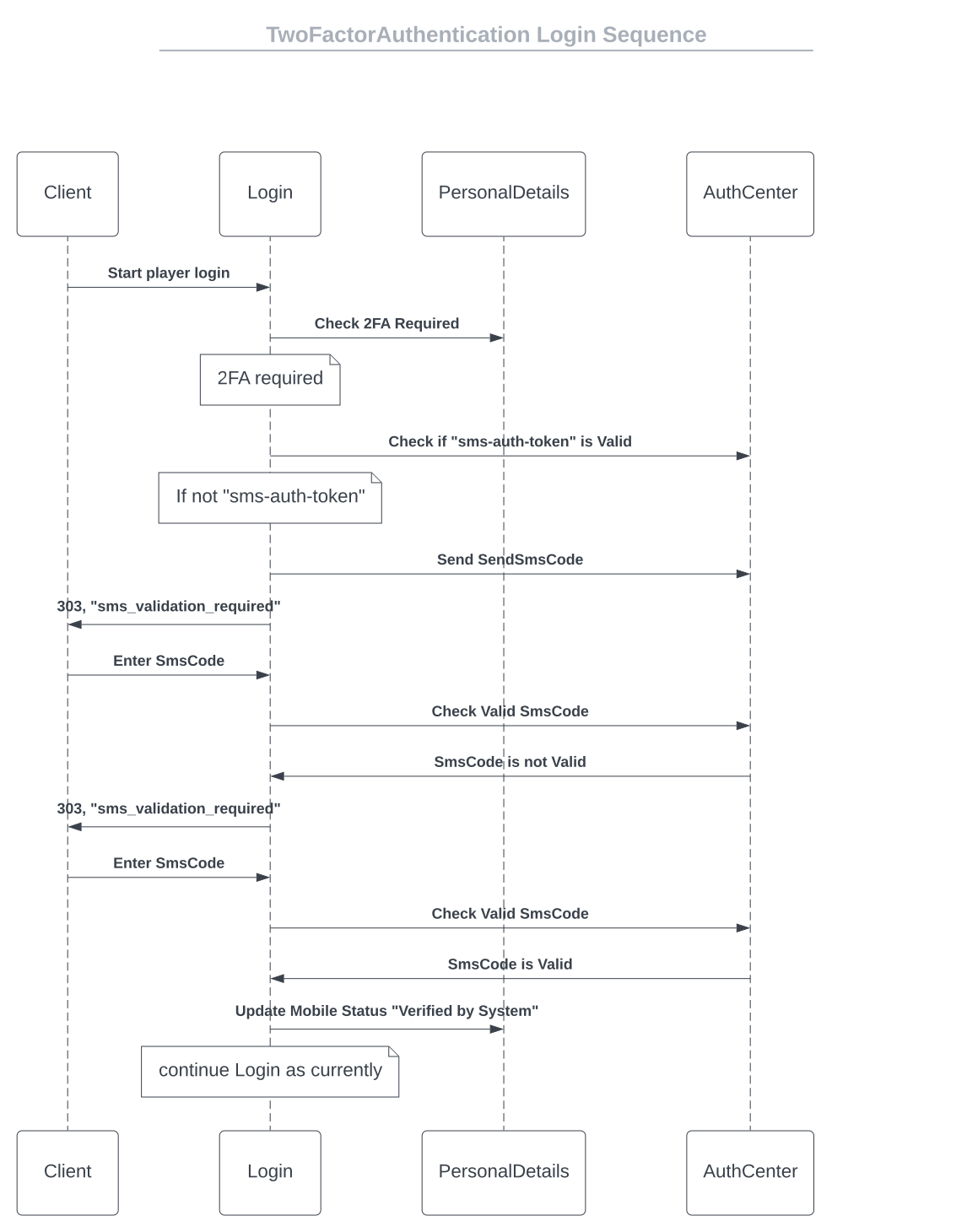
Endpoint that is used to send code to player, part of the verification of the player.
/gateway/player-data/{version}/send/code/{brand_id}{
"mobile_number": "44-123456789"
}| Name | In | Type | Required | Description |
|---|---|---|---|---|
| version | path | string | true | The API version to use. |
| brand_id | path | int | true | The ID of the casino. If a brand_id is not provided, all message formats will be fetched from default storage. |
| x-auth-token | header | string | true | Player login session. |
| 2fa-auth-token | header | string | true | 2fa auth token, which will be saved in browser. |
| mobile_number | body | string | true | Player request phone number. |
Status 200
200 Response
{
  "status": "Success",
  "data": {
    "description": "Success",
    "2fa_auth_token": "c8bfd06c-f934-4cb9-a554-694825b89328"
  }
}
Status 400
{
  "errMsg": "invalid input - invalid brand id"
}
Status 401
{
  "errMsg": "invalid input - invalid token"
}
If you receive a 422 error code for an Unprocessable Entity error, the client should not use the Message Format method to send a request to the server, but use its internal logic to present the message for one or more fields that didn’t pass the validation.
When a 422 validation error occurs, the response returns an array of one or more error codes detailing the fields that have validation errors. Multiple error messages are issued in the same validation form. The site should handle these validation errors and present a validation message to the player.
This will not call the message format.
The following table explains validation code behavior:
| Field | Description |
|---|---|
| 2fa-auth-token | Auth Token is already verified |
| description | Please wait before sending again |
| description | Please wait before sending again in %d seconds |
| description | Authentication attempts limit exceeded |
| description | Auth token does not exist |
| remaining_time* | Seconds left before additional call will be allowed (Optional) |
{
  "status": "Failed",
  "data": {
    "description": "Please wait before sending again in 50 seconds",
    "2fa_auth_token": "c8bfd06c-f934-4cb9-a554-694825b89328",
    "remaining_time": 50
  }
}
Status 500
{
  "result": "internal server error"
}Endpoint that is used to validate code from player, part of the verification of the player. Please not, we are executing login if 2fa was successfully validated, response within the ‘data’ section will contain same response as we currently have in login method (on success with additional fields), all additional validations that needs to be done (i.e TNC_REQUIRED) will be returned in the 422 error code under data section, with player token as well, can be used
/gateway/player-data/{version}/validate/code/{brand_id}{
"sms_code": "123456"
}| Name | In | Type | Required | Description |
|---|---|---|---|---|
| version | path | string | true | The API version to use. |
| brand_id | path | int | true | The ID of the casino. If a brand_id is not provided, all message formats will be fetched from default storage. |
| x-auth-token | header | string | true | Player login session. |
| 2fa-auth-token | header | string | true | 2fa auth token, which will be saved in browser. |
| sms_code | body | string | true | received code from player. |
Status 200
200 Response
{
  "status": "Success",
  "data": {
    "description": "Valid",
    "2fa_auth_token": "c8bfd06c-f934-4cb9-a554-694825b89328",
    "updated_fields": {
      "mobile_number": "44-12456789",
      "verification_status": "1"
    },
    "result": "OK",
    "token": "8e62cc96-a21f-11ed-be7e-b289e620c23d",
    "auth_token": "8e62cc96-a21f-11ed-be7e-b289e620c23d",
    "status": 200
  }
}
Status 400
{
  "errMsg": "invalid input - invalid brand id"
}
Status 401
{
  "errMsg": "invalid input - invalid token"
}
If you receive a 422 error code for an Unprocessable Entity error, the client should not use the Message Format method to send a request to the server, but use its internal logic to present the message for one or more fields that didn’t pass the validation.
When a 422 validation error occurs, the response returns an array of one or more error codes detailing the fields that have validation errors. Multiple error messages are issued in the same validation form. The site should handle these validation errors and present a validation message to the player.
This will not call the message format.
The following table explains validation code behavior:
| Field | Description |
|---|---|
| 2fa-auth-token | Auth Token is already verified |
| 2fa-auth-token | Auth token does not exist |
{
  "status": "Error",
  "data": {
    "description": "Please wait before sending again in 50 seconds",
    "2fa_auth_token": "c8bfd06c-f934-4cb9-a554-694825b89328"
  }
}
Status 500
{
  "result": "internal server error"
}Endpoint that is used to get player mobile data.
/gateway/player-data/{version}/{brand_id}| Name | In | Type | Required | Description |
|---|---|---|---|---|
| version | path | string | true | The API version to use. |
| brand_id | path | int | true | The ID of the casino. If a brand_id is not provided, all message formats will be fetched from default storage. |
| x-auth-token | path | string | true | Player login session. |
200 Response
{
  "status": "Success",
  "data": {
    "brand_id": 1009,
    "player_id": 32574,
    "is_2fa_required": true,
    "mobile": {
      "number": "44-123456789",
      "verification_status": 1,
      "status": "Active",
      "status_comment": "Comment"
    }
  }
}
Status 400
{
  "errMsg": "invalid input - invalid brand id"
}
Status 401
{
  "errMsg": "invalid input - invalid token"
}
Status 500
{
  "result": "internal server error"
}Endpoint that is used to update player mobile data.
/gateway/player-data/{version}/send/code/{brand_id}{
"brand_id": 1009,
"player_id": 32574,
"is_2fa_required": true,
"mobile": {
"number": "44-123456789",
"status_comment": "Comment"
}
}| Name | In | Type | Required | Description |
|---|---|---|---|---|
| version | path | string | true | The API version to use. |
| brand_id | path | int | true | The ID of the casino. If a brand_id is not provided, all message formats will be fetched from default storage. |
| x-auth-token | path | string | true | Player login session. |
200 Response
{
  "status": "Success",
  "data": null
}
Status 400
{
  "errMsg": "invalid input - invalid brand id"
}
Status 401
{
  "errMsg": "invalid input - invalid token"
}
Status 403
{
  "status": "Error",
  "data": {
    "data": "194eba0c-a6f0-11ed-aca7-caa409abce86"
  },
  "message": "Mobile verification required",
  "userFriendlyMessage": "Mobile verification required"
}
Status 500
{
  "result": "internal server error"
}This section will display all available endpoints to get KYC data (Identification URL, Status).
/gateway/threat-assessment/{version}/kyc/{brand_id}/identification/url| Name | In | Type | Required | Description |
|---|---|---|---|---|
| version | path | string | true | The API version to use |
| brand_id | path | int | true | Brand identifier |
| Identification-token | header | string | true | MD5 hash token for identification(return on login response or on identification status response) |
| lang | query | string | false | Language code (default: en) |
Note: There are 20 attempts allowed per identification journey within 24 hours, counted from the time of the first attempt.
| Name | Type | Description |
|---|---|---|
| journey_id | string | Unique identifier for the KYC journey |
| url | string | URL for KYC identification session |
| qr_code | string | QR code for KYC identification session (Base64 encoded) |
| session_id | string | Unique session identifier for KYC identification |
Status 200
{
  "status": "Success",
  "data": {
    "journey_id": "test-journey-id",
    "url": "http://example.com/APIHandler/idshostSession/?sessionID=test-session-id&lang=en",
    "qr_code": "uhisdgfjasgjhgd",
    "session_id": "test-session-id"
  }
}
Status 400
{
  "status": "Error",
  "message": "Bad Request",
  "user_friendly_message": "token parameter is required for identification token validation"
}

> Status 403

```json
{
  "status": "Error",
  "message": "Journey is not allowed",
  "user_friendly_message": "Journey is not allowed for this player"
}
Status 429
{
  "status": "Error",
  "message": "Attempt limit reached",
  "user_friendly_message": "Attempt limit reached, please try again later"
}
Status 500
{
  "status": "Error",
  "data": null,
  "message": "Internal server error",
  "user_friendly_message": "Failed to get KYC ID scan URL"
}/gateway/threat-assessment/:version/kyc/:brand_id/identification/status| Name | In | Type | Required | Description |
|---|---|---|---|---|
| brand_id | path | int | true | Brand identifier |
| version | path | string | true | The API version to use. |
| x-auth-token | header | string | false | Player auth token from Login response |
| Identification-token | header | string | false | Identification token returned by Login or Identification Status |
Note: Provide exactly one of the headers x-auth-token or Identification-token per request. Only one is required.
| Name | Type | Description |
|---|---|---|
| brand_id | int | The ID of the brand. |
| player_id | int | The ID of the player. |
| initialization_date | string | The date when the KYC process was initialized (YYYY-MM-DD HH:MM:SS). |
| initialized | boolean | Indicates if the KYC process has been initialized. |
| remaining_days | int | The number of days remaining for KYC completion. If 0, KYC is complete or expired. |
| id_status | string | The status of the identification (Approved, Pending, N/A, Rejected, Expired, Under Review). |
| poa_status | string | The status of the proof of address (Approved, Pending, N/A, Rejected, Expired, Under Review). |
| documents_required | boolean | Indicates if additional documents are required for KYC completion. |
| token | string | token to send as header Identification-token to the KYC Identification URL; empty string when documents_required is false |
Status 200
{
  "status": "Success",
  "data": {
    "brand_id": 2,
    "player_id": 100,
    "initialization_date": "2024-01-15 10:30:00",
    "initialized": true,
    "remaining_days": 0,
    "id_status": "Approved",
    "poa_status": "Approved",
    "documents_required": false,
    "identification-token": ""
  }
}
Status 200 (Documents Required)
{
  "status": "Success",
  "data": {
    "brand_id": 2,
    "player_id": 102,
    "initialization_date": "2024-01-15 10:30:00",
    "initialized": true,
    "remaining_days": 12,
    "id_status": "Approved",
    "poa_status": "N/A",
    "documents_required": true,
    "identification-token": "35401810700b872c0ac8ccc3a8686291"
  }
}
Status 400
{
    "status": "Error",
    "data": "",
    "message": "Bad Request",
    "userFriendlyMessage": "token parameter is required for identification token validation"
}
Status 401 -
x-auth-tokenused
{
    "status": "Error",
    "data": {
        "errMsg": "invalid input - invalid token"
    },
    "message": "authentication failed",
    "userFriendlyMessage": "Authentication failed"
}
Status 401 -
Identification-tokenused
{
    "status": "Error",
    "data": "",
    "message": "Unauthorized",
    "userFriendlyMessage": "token is not associated with any player"
}
Status 500
{
  "status": "Error",
  "data": null,
  "message": "Internal server error",
  "user_friendly_message": "Failed to get player identification status"
}Draft Documentation - This section is currently under review and may be subject to changes.
This section displays all available endpoints for the notification center system. The notification center allows players to receive, view, and manage in-app notifications for various events such as bonuses, promotions, and account updates.
Service: go_marketing
Routes: Configured in go_gateway
Note: POST (creating notifications) is an internal operation only and not exposed via the gateway.
Draft Documentation - This section is currently under review and may be subject to changes.
This method retrieves all notifications for a player, with an optional filter for unread notifications only. Notifications are retained for 90 days and returned in descending order (newest first).
/gateway/notifications/{version}/{brand_id}| Name | In | Type | Required | Description |
|---|---|---|---|---|
| version | path | string | true | The API version to use (e.g., “1.0”). |
| brand_id | path | int | true | The ID of the casino brand. |
| only_unread | query | boolean | false | If true, returns only unread notifications. Defaults to false (all). |
| Name | Type | Required | Description |
|---|---|---|---|
| x-auth-token | string | true | Player authentication token. |
Status 200
{
  "status": "Success",
  "data": {
    "notifications": [
      {
        "message_id": "a7f8c934-1b2d-4e5f-9c8a-7d6e5f4a3b2c",
        "brand_id": 1001,
        "player_id": 12345,
        "event": "bonus_granted",
        "event_details": {
          "bonus_amount": 100,
          "bonus_type": "welcome",
          "currency": "USD"
        },
        "is_read": false,
        "time": "2025-10-22 14:30:45"
      },
      {
        "message_id": "b8e9d045-2c3e-5f6g-0d9b-8e7f6g5b4c3d",
        "brand_id": 1001,
        "player_id": 12345,
        "event": "promotion_available",
        "event_details": {
          "promo_id": "PROMO123",
          "expires_at": "2025-11-15",
          "conditions": {
            "min_bet": 100,
            "multiplier": 3
          }
        },
        "is_read": true,
        "time": "2025-10-21 10:15:30"
      }
    ],
    "total_count": 2
  }
}| Name | Type | Description |
|---|---|---|
| notifications | array | Array of notification objects. |
| notifications.message_id | string | Unique notification identifier (UUID). |
| notifications.brand_id | int | Brand identifier. |
| notifications.player_id | int | Player identifier. |
| notifications.event | string | Event type (e.g., “bonus_granted”, “promotion_available”). |
| notifications.event_details | object | Event-specific data (flexible JSON object). |
| notifications.is_read | boolean | Whether the notification has been read. |
| notifications.time | string | Notification timestamp in format “YYYY-MM-DD HH:MM:SS”. |
| total_count | int | Total number of notifications returned. |
Request:
GET /notifications/1.0/1001/12345?only_unread=true
x-auth-token: e74af034-a346-4d5c-be97-f7ed83f373a7
Response:
{
  "status": "Success",
  "data": {
    "notifications": [
      {
        "message_id": "a7f8c934-1b2d-4e5f-9c8a-7d6e5f4a3b2c",
        "brand_id": 1001,
        "player_id": 12345,
        "event": "bonus_granted",
        "event_details": {
          "bonus_amount": 100,
          "bonus_type": "welcome"
        },
        "is_read": false,
        "time": "2025-10-22 14:30:45"
      }
    ],
    "total_count": 1
  }
}
Status 401
{
  "status": "error",
  "message": "Unauthorized - Invalid or missing authentication token"
}
Status 500
{
  "status": "error",
  "message": "Internal server error"
}event_details field is flexible and can contain any event-specific data as a JSON object.bonus_granted, promotion_available, deposit_success, kyc_approved, account_update.Draft Documentation - This section is currently under review and may be subject to changes.
This method marks one or more notifications as read for a player. Multiple notifications can be updated in a single request by providing an array of message IDs.
/gateway/notifications/{version}/{brand_id}{
"message_ids": [
"a7f8c934-1b2d-4e5f-9c8a-7d6e5f4a3b2c",
"b8e9d045-2c3e-5f6g-0d9b-8e7f6g5b4c3d",
"c9f0e156-3d4f-6g7h-1e0c-9f8g7h6c5d4e"
]
}| Name | In | Type | Required | Description |
|---|---|---|---|---|
| version | path | string | true | The API version to use (e.g., “1.0”). |
| brand_id | path | int | true | The ID of the casino brand. |
| message_ids | body | array | true | Array of notification message IDs (UUIDs) to mark as read. |
| Name | Type | Required | Description |
|---|---|---|---|
| x-auth-token | string | true | Player authentication token. |
Status 200
{
"status": "Success",
"data": {
"message": "notification was successfully updated"
}
}| Name | Type | Description |
|---|---|---|
| status | string | Operation status (“Success”). |
| message | string | Confirmation message. |
Request:
{
"message_ids": [
"a7f8c934-1b2d-4e5f-9c8a-7d6e5f4a3b2c"
]
}Response:
{
"status": "Success",
"data": {
"message": "notification was successfully updated"
}
}Request:
{
  "message_ids": [
    "a7f8c934-1b2d-4e5f-9c8a-7d6e5f4a3b2c",
    "b8e9d045-2c3e-5f6g-0d9b-8e7f6g5b4c3d",
    "c9f0e156-3d4f-6g7h-1e0c-9f8g7h6c5d4e"
  ]
}Response:
{
  "status": "Success",
  "data": {
    "message": "notification was successfully updated"
  }
}Status 400
{
  "status": "error",
  "message": "Bad Request - Invalid request body or missing message_ids"
}
Status 401
{
  "status": "error",
  "message": "Unauthorized - Invalid or missing authentication token"
}
Status 500
{
  "status": "error",
  "message": "Internal server error"
}is_read flag to true and sets the update_time to the current timestamp.message_ids array will return a 400 error.Draft Documentation - This section is currently under review and may be subject to changes.
This section displays the Server-Sent Events (SSE) implementation for real-time player notifications. SSE provides a one-way communication channel from the server to the client, enabling instant delivery of notifications and updates without the need for polling.
Service: go_gateway
Protocol: HTTP with text/event-stream content type
The SSE system allows players to maintain a persistent connection to receive real-time events as they occur. Events are published via Redis Pub/Sub and delivered to all connected clients subscribed to the player’s event stream.
Client → SSE Connection → Gateway → Redis Pub/Sub → Event PublishersEvent Channel Pattern: SSE::{brand_id}::{player_id}
The SSE system currently supports the following event types:
Additional event types can be added as the platform evolves.
| Parameter | Default | Description |
|---|---|---|
| SSE_CONNECTION_LIMIT | 50000 | Maximum concurrent SSE connections |
| EVENTS_REDIS_STORAGE | - | Redis host for SSE event publishing |
| keepAlivePeriod | 15s | Heartbeat interval for connection health |
| eventChannelBufferSize | 50 | Event buffer size for burst handling |
Draft Documentation - This section is currently under review and may be subject to changes.
This endpoint establishes a Server-Sent Events (SSE) connection for receiving real-time notifications and updates. The connection remains open indefinitely, with automatic keep-alive heartbeats every 15 seconds.
/gateway/sse/{brand_id}/stream| Name | In | Type | Required | Description |
|---|---|---|---|---|
| brand_id | path | int | true | The ID of the casino brand. |
| Name | Type | Required | Description |
|---|---|---|---|
| x-auth-token | string | true | Player authentication token. |
| Accept | string | true | Must be set to text/event-stream. |
Status 200 (Connection Established)
Content-Type: text/event-stream; charset=utf-8
Upon successful connection, the server sends an initial “connected” event:
data: {"type":"connected","timestamp":"2025-10-22T14:30:45Z"}| Field | Type | Description |
|---|---|---|
| type | string | Event type (“connected”). |
| timestamp | string | ISO 8601 timestamp in RFC3339 format. |
The server sends keep-alive heartbeats every 15 seconds to maintain the connection:
: keepalive 2025-10-22 14:30:45
data: {"type":"keepalive","timestamp":"2025-10-22 14:30:45"}| Field | Type | Description |
|---|---|---|
| type | string | Event type (“keepalive”). |
| timestamp | string | Timestamp in format “YYYY-MM-DD HH:MM:SS”. |
Note: The first line (starting with :) is an SSE comment containing the timestamp. The second line contains the JSON data payload.
When events occur, they are immediately pushed to the client:
data: {"brand_id":1001,"player_id":12345,"event_type":"notification","event_data":{"message_id":"a7f8c934-1b2d-4e5f-9c8a-7d6e5f4a3b2c","event":"bonus_granted","event_details":{"bonus_amount":100,"bonus_type":"welcome"}}}| Field | Type | Description |
|---|---|---|
| brand_id | int | Brand identifier. |
| player_id | int | Player identifier. |
| event_type | string | Type of event (e.g., “notification”). |
| event_data | object | Event-specific data payload (structure varies by type). |
const eventSource = new EventSource(
  '/gateway/sse/1001/stream',
  {
    headers: {
      'x-auth-token': 'e74af034-a346-4d5c-be97-f7ed83f373a7'
    }
  }
);

eventSource.onmessage = (event) => {
  const data = JSON.parse(event.data);
  console.log('Received event:', data);
};

eventSource.onerror = (error) => {
  console.error('SSE connection error:', error);
};data: {"type":"connected","timestamp":"2025-10-22T14:30:45Z"}: keepalive 2025-10-22 14:31:00
data: {"type":"keepalive","timestamp":"2025-10-22 14:31:00"}data: {"brand_id":1001,"player_id":12345,"event_type":"notification","event_data":{"message_id":"a7f8c934-1b2d-4e5f-9c8a-7d6e5f4a3b2c","event":"bonus_granted","event_details":{"bonus_amount":100,"bonus_type":"welcome","currency":"USD"}}}Status 400
{
  "status": "error",
  "message": "Bad Request - Invalid brand_id"
}
Status 401
{
  "status": "error",
  "message": "Unauthorized - Invalid or missing authentication token"
}
Status 429
{
  "status": "error",
  "message": "Too Many Requests - Connection limit reached"
}Note: When the connection limit (SSE_CONNECTION_LIMIT) is reached, new connection attempts will be rejected with a 429 status code.
SSE Error Event (during active connection)
If an error occurs during an active connection, the server may send an error event:
data: {"type":"error","message":"Failed to subscribe to events"}SSE_CONNECTION_LIMIT environment variableConnections can be terminated by:
Clients should implement automatic reconnection with exponential backoff:
let retryDelay = 1000; // Start with 1 second

eventSource.onerror = () => {
  eventSource.close();

  setTimeout(() => {
    // Reconnect
    eventSource = new EventSource('/gateway/sse/1001/stream', {
      headers: { 'x-auth-token': token }
    });

    // Increase delay for next retry (up to 30 seconds)
    retryDelay = Math.min(retryDelay * 2, 30000);
  }, retryDelay);
};SSE::{brand_id}::{player_id}Draft Documentation - This section is currently under review and may be subject to changes.
This section documents the various event types that can be delivered via Server-Sent Events (SSE). Each event type has a specific structure and purpose.
SSE events are published to Redis using the channel pattern SSE::{brand_id}::{player_id} and delivered in real-time to connected clients. All events follow a consistent base structure with event-specific data payloads.
All SSE events (excluding system events like “connected” and “keepalive”) follow this structure:
{
  "brand_id": 1001,
  "player_id": 12345,
  "event_type": "notification",
  "event_data": {
    // Event-specific payload
  }
}| Field | Type | Description |
|---|---|---|
| brand_id | int | The casino brand identifier. |
| player_id | int | The player identifier. |
| event_type | string | The type of event (e.g., “notification”). |
| event_data | object | Event-specific data (structure varies by type). |
These events are sent by the SSE system itself for connection management:
Sent immediately upon successful SSE connection establishment.
{
  "type": "connected",
  "timestamp": "2025-10-22T14:30:45Z"
}Sent every 15 seconds to maintain the connection.
: keepalive 2025-10-22 14:30:45
data: {"type":"keepalive","timestamp":"2025-10-22 14:30:45"}Sent when an error occurs during the SSE connection.
{
"type": "error",
"message": "Failed to subscribe to events"
}These events are published by various services in the platform:
Events are published by backend services using the SSE service from go_casino_kit:
sseService.Publish(ctx, brandID, playerID, eventType, eventData)This publishes to the Redis channel SSE::{brandID}::{playerID}, which the gateway listens to and forwards to connected clients.
The SSE system is designed to be extensible. Future event types may include:
data: prefixDraft Documentation - This section is currently under review and may be subject to changes.
The notification event is sent via SSE when a new in-app notification is created for a player. This provides real-time delivery of important updates such as bonuses, promotions, account changes, and other player-relevant information.
event_type: notification
{
"brand_id": 1001,
"player_id": 12345,
"event_type": "notification",
"event_data": {
"message_id": "a7f8c934-1b2d-4e5f-9c8a-7d6e5f4a3b2c",
"event": "bonus_granted",
"event_details": {
"bonus_amount": 100,
"bonus_type": "welcome",
"currency": "USD"
},
"is_read": false,
"time": "2025-10-22 14:30:45"
}
}| Field | Type | Description |
|---|---|---|
| brand_id | int | The casino brand identifier. |
| player_id | int | The player identifier. |
| event_type | string | Always “notification” for this event type. |
| event_data | object | Notification-specific data (see below). |
| Field | Type | Description |
|---|---|---|
| message_id | string | Unique notification identifier (UUID). |
| event | string | Notification event type (e.g., “bonus_granted”, “promotion_available”). |
| event_details | object | Event-specific details (flexible JSON structure). |
| is_read | boolean | Whether the notification has been read (always false for new notifications). |
| time | string | Notification creation timestamp in format “YYYY-MM-DD HH:MM:SS”. |
This notification is sent when a player receives a bonus.
{
"brand_id": 1001,
"player_id": 12345,
"event_type": "notification",
"event_data": {
"message_id": "a7f8c934-1b2d-4e5f-9c8a-7d6e5f4a3b2c",
"event": "bonus_granted",
"event_details": {
"bonus_amount": 100,
"bonus_type": "welcome",
"currency": "USD",
"bonus_id": 789
},
"is_read": false,
"time": "2025-10-22 14:30:45"
}
}This notification is sent when a new promotion becomes available for a player.
{
"brand_id": 1001,
"player_id": 12345,
"event_type": "notification",
"event_data": {
"message_id": "b8e9d045-2c3e-5f6g-0d9b-8e7f6g5b4c3d",
"event": "promotion_available",
"event_details": {
"promo_id": "PROMO123",
"promo_name": "Weekend Reload Bonus",
"expires_at": "2025-11-15",
"conditions": {
"min_bet": 100,
"multiplier": 3,
"max_bonus": 500
}
},
"is_read": false,
"time": "2025-10-22 15:00:00"
}
}This notification is sent after a successful deposit.
{
"brand_id": 1001,
"player_id": 12345,
"event_type": "notification",
"event_data": {
"message_id": "c9f0e156-3d4f-6g7h-1e0c-9f8g7h6c5d4e",
"event": "deposit_success",
"event_details": {
"amount": 250.00,
"currency": "USD",
"payment_method": "credit_card",
"transaction_id": "TXN987654"
},
"is_read": false,
"time": "2025-10-22 16:15:30"
}
}This notification is sent when KYC verification is approved.
{
"brand_id": 1001,
"player_id": 12345,
"event_type": "notification",
"event_data": {
"message_id": "d0g1f267-4e5g-7h8i-2f1d-0g9h8i7d6e5f",
"event": "kyc_approved",
"event_details": {
"verification_level": "basic",
"approved_at": "2025-10-22 17:00:00",
"limits_updated": true
},
"is_read": false,
"time": "2025-10-22 17:00:05"
}
}This notification is sent for important account changes.
{
"brand_id": 1001,
"player_id": 12345,
"event_type": "notification",
"event_data": {
"message_id": "e1h2g378-5f6h-8i9j-3g2e-1h0i9j8e7f6g",
"event": "account_update",
"event_details": {
"update_type": "email_changed",
"new_email": "new****@example.com",
"requires_verification": true
},
"is_read": false,
"time": "2025-10-22 18:00:00"
}
}This notification is sent when a player wins a tournament.
{
"brand_id": 1001,
"player_id": 12345,
"event_type": "notification",
"event_data": {
"message_id": "f2i3h489-6g7i-9j0k-4h3f-2i1j0k9f8g7h",
"event": "tournament_win",
"event_details": {
"tournament_id": "123456-13456-123456-123456",
"transaction_id": "123123",
"tournament_name": "Tournament Name",
"tournament_points": 1500,
"tournament_start_date": "2025-08-20 00:00:00",
"tournament_end_date": "2025-08-27 00:00:00",
"tournament_position": 1,
"template_id": "1",
"prize_type": 1,
"player_id": 12345,
"casino_id": 1001,
"prize_value": "100",
"prize_name": "test",
"total_rounds": 10,
"total_bets": "450",
"total_wins": "1425",
"timestamp": "2025-08-27 00:00:00"
},
"is_read": false,
"time": "2025-08-27 00:00:05"
}
}The notification system supports various event types. Here are the most common:
| Event Type | Description |
|---|---|
| bonus_granted | Player received a bonus |
| promotion_available | New promotion available for player |
| deposit_success | Successful deposit transaction |
| withdrawal_approved | Withdrawal request approved |
| kyc_approved | KYC verification approved |
| kyc_rejected | KYC verification rejected |
| account_update | Important account changes |
| tournament_update | Tournament status or position change |
| tournament_win | Player won a tournament |
| limit_reminder | Responsible gaming limit reminder |
| document_required | Additional documents needed |
The event_details field is a flexible JSON object that can contain any event-specific data. The structure varies based on the event type. Common patterns include:
amount, currency fieldsexpires_at, valid_until fieldsstatus, previous_status fieldstransaction_id, bonus_id, promo_id fieldsconst eventSource = new EventSource('/gateway/sse/1001/stream', {
headers: {
'x-auth-token': playerToken
}
});
eventSource.onmessage = (event) => {
const data = JSON.parse(event.data);
// Filter for notification events
if (data.event_type === 'notification') {
const notification = data.event_data;
// Handle based on event type
switch (notification.event) {
case 'bonus_granted':
showBonusNotification(notification);
break;
case 'promotion_available':
showPromotionNotification(notification);
break;
case 'deposit_success':
showDepositConfirmation(notification);
break;
default:
showGenericNotification(notification);
}
// Update notification center
addToNotificationCenter(notification);
}
};
function showBonusNotification(notification) {
const { bonus_amount, currency, bonus_type } = notification.event_details;
showToast(`You received a ${bonus_type} bonus of ${bonus_amount} ${currency}!`);
playNotificationSound();
incrementNotificationBadge();
}Notification events are automatically published by the go_marketing service when a new notification is created:
// From go_marketing/services/notifications_service.go
func (service *NotificationsService) InsertNewNotifications(
ctx context.Context,
notifications []domain.Notification
) error {
// Insert into database
err := service.notificationsDao.InsertNotification(ctx, notifications)
if err != nil {
return err
}
// Publish SSE event for each notification
for _, notification := range notifications {
eventData := map[string]interface{}{
"message_id": notification.MessageID,
"event": notification.Event,
"event_details": notification.EventDetails,
"is_read": notification.IsRead,
"time": notification.Time.Format("2006-01-02 15:04:05"),
}
service.sseService.Publish(
ctx,
notification.BrandId,
notification.PlayerId,
sse.SSENotificationEvent,
eventData,
)
}
return nil
}When a notification event is received via SSE:
To retrieve the full list of notifications (including older ones), use the Get Notifications endpoint.
To mark notifications as read, use the Mark Notifications as Read endpoint.
message_id to avoid processing duplicate notificationsDraft Documentation - This section is currently under review and may be subject to changes.
The gamification balance update event is sent via SSE when a player’s gamification coin balance changes. This provides real-time updates for balance changes due to earning, redeeming, or other gamification-related activities.
event_type: gamification_balance_update
{
"brand_id": 1001,
"player_id": 12345,
"event_type": "gamification_balance_update",
"event_data": {
"balance": 1500,
"total_received": 5000,
"total_redeemed": 3500
}
}| Field | Type | Description |
|---|---|---|
| brand_id | int | The casino brand identifier. |
| player_id | int | The player identifier. |
| event_type | string | Always “gamification_balance_update” for this event. |
| event_data | object | Balance update data (see below). |
| Field | Type | Description |
|---|---|---|
| balance | decimal | Current gamification coin balance after the update. |
| total_received | decimal | Total gamification coins received by the player (lifetime). |
| total_redeemed | decimal | Total gamification coins redeemed by the player (lifetime). |
This event is sent when a player earns gamification coins (e.g., from gameplay activity).
{
"brand_id": 1001,
"player_id": 12345,
"event_type": "gamification_balance_update",
"event_data": {
"balance": 2500,
"total_received": 10000,
"total_redeemed": 7500
}
}This event is sent when a player redeems gamification coins for rewards.
{
"brand_id": 1001,
"player_id": 12345,
"event_type": "gamification_balance_update",
"event_data": {
"balance": 500,
"total_received": 10000,
"total_redeemed": 9500
}
}This event shows a player who has earned coins but not yet redeemed any.
{
"brand_id": 1001,
"player_id": 12345,
"event_type": "gamification_balance_update",
"event_data": {
"balance": 750,
"total_received": 750,
"total_redeemed": 0
}
}const eventSource = new EventSource('/gateway/sse/1001/stream', {
headers: {
'x-auth-token': playerToken
}
});
eventSource.onmessage = (event) => {
const data = JSON.parse(event.data);
// Filter for gamification balance update events
if (data.event_type === 'gamification_balance_update') {
const balanceData = data.event_data;
updateGamificationBalanceUI(balanceData);
}
};
function updateGamificationBalanceUI(balanceData) {
// Update the displayed balance
document.getElementById('coin-balance').textContent =
formatNumber(balanceData.balance);
// Optionally update lifetime stats
document.getElementById('total-earned').textContent =
formatNumber(balanceData.total_received);
document.getElementById('total-redeemed').textContent =
formatNumber(balanceData.total_redeemed);
// Show visual feedback for balance change
highlightBalanceChange();
}
function formatNumber(value) {
return new Intl.NumberFormat('en-US').format(value);
}This event is triggered in the following scenarios:
| Scenario | Description |
|---|---|
| Coin Earning | Player earns coins from gameplay or activities |
| Coin Redemption | Player redeems coins for rewards or bonuses |
| Admin Adjustment | Manual balance adjustment by operator |
| Promotional Credit | Promotional coins added to player’s balance |
| Expiration | Coins expired due to inactivity or time limits |
Draft Documentation - This section is currently under review and may be subject to changes.
The Player Daily Rewards Program Event is sent via SSE when a player’s state changes.
event_type: DRP_STATE_CHANGED
{
"brand_id" : 1,
"player_id" : 12345,
"event_type" : "DRP_STATE_CHANGED",
"event_data" : {
"day" : "1",
"program_id": "324234213-421342134-42314-42314123"
"new_state" : {
"claimed_at" : "",
"day_number" : 1,
"day_value" : "10",
"history_info" : null,
"info_codes" : null,
"name" : "Day 1",
"status_code" : 0,
"transaction_id" : "",
"type" : "gcoins",
"updated_at" : "2026-01-25 06:39:19"
},
"old_state" : {
...
}
}
}| Field | Type | Description |
|---|---|---|
| brand_id | int | The casino brand identifier. |
| player_id | int | The player identifier. |
| event_type | string | Always “DRP_STATE_CHANGED” for this event. |
| event_data | object | Balance update data (see below). |
| Field | Type | Description |
|---|---|---|
| “day_value”: “100”, | Reward value | |
| “type”: “gcoins”, | Reward type. Currently “gcoins” only. If empty - no reward for particular day of program is granted | |
| “name”: “Day 1”, | Label defined in CBO | |
| “transaction_id”: null, | Non-empty if reward is claimed | |
| “updated_at”: “”, | Date when action (LOGIN) is taken by player | |
| “claimed_at”: “”, | Non-empty if reward is claimed | |
| “day_number”: 4 | number | Actual program day when login was made |
| “status_code”: 0, | 0 - Eligible, 1 - Not Eligible, 2 - Future, 3 - Out od range | |
| info_codes: [1,2] | Array of info codes/error codes | |
| “history_info”: [] | array | Info why this day is moved vs programs days, if its moved |
This event is sent when a player login to casino and passes all rules
{
"brand_id" : 1,
"player_id" : 12345,
"event_type" : "DRP_STATE_CHANGED",
"event_data" : {
"day" : "1",
"program_id": "324234213-421342134-42314-42314123"
"new_state" : {
"claimed_at" : "",
"day_number" : 1,
"day_value" : "10",
"history_info" : null,
"info_codes" : null,
"name" : "Day 1",
"status_code" : 0,
"transaction_id" : "",
"type" : "gcoins",
"updated_at" : "2026-01-25 06:39:19"
},
"old_state" : {
"claimed_at" : "",
"day_number" : 1,
"day_value" : "",
"history_info" : null,
"info_codes" : [ 100 ],
"name" : "",
"status_code" : 1,
"transaction_id" : "",
"type" : "",
"updated_at" : ""
}
}
}const eventSource = new EventSource('/gateway/sse/1001/stream', {
headers: {
'x-auth-token': playerToken
}
});
eventSource.onmessage = (event) => {
const data = JSON.parse(event.data);
// Filter for gamification balance update events
if (data.event_type === 'DRP_STATE_CHANGED') {
const newStateData = data.event_data;
.... call your UI func
}
};
This event is triggered in the following scenarios:
| Scenario | Description |
|---|---|
| PLAYER LOGIN | When player login affected the state |
| PLAYER DEPOSIT | When player deposit affected the state |